.webp?width=130&height=24&name=SuprConfig%20(2).webp)





 Book a migration call






The most dangerous sentence in any CRM migration is "the record counts match." I've heard it in kickoff calls, in Slack channels at 11pm the night before cutover, and in post-mortems after everything went wrong. It feels like confirmation, but it isn't. A record count tells you the data moved. It tells you nothing about whether the data matches. Did associations survive? Did deal stages land in the right place? Did three years of call history attach to the right contacts, or dissolve into a pile of untimestamped notes?
Go-live is not a moment. It's a validation gate. Most failed migrations pass through that gate unverified because the team checked the wrong thing. This crm migration checklist covers the 12 verifications that separate a clean cutover from a support-ticket avalanche, and where each one belongs in a structured, four-phase migration that front-loads validation instead of discovering failures after cutover.
Why "the record counts match" is not a go-live signal
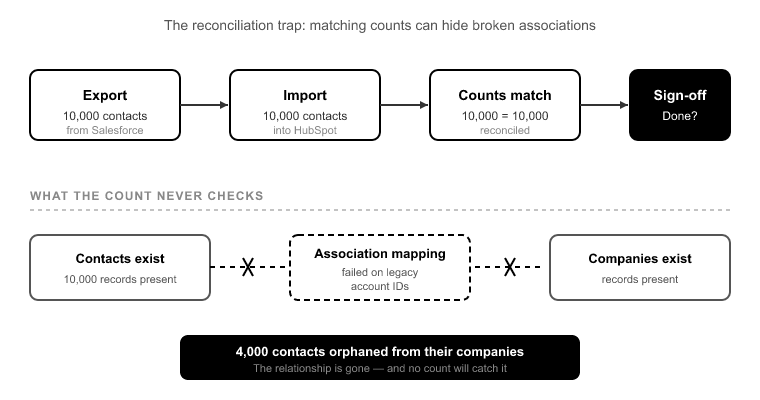
Here's the reconciliation trap. You export 10,000 contacts from Salesforce. You import 10,000 contacts into HubSpot. The numbers reconcile. Sign-off, done.
Except 4,000 of those contacts are now orphaned from their companies. The association mapping failed on every record where the source used a legacy account ID that no longer resolved. The contacts exist. The companies exist. The relationship between them does not. Your count reconciliation will never catch this, because both objects imported at full count. It's the links between them that broke.
Scale that up. In a 400,000-record Salesforce org, a 1% association failure rate is 4,000 broken relationships.[1] It's invisible in a count check and catastrophic in daily use, because a rep opens a company record and sees no contacts, or opens a deal and sees no associated company. This is the single most under-validated part of any migration, and it's exactly why counting records is the wrong go-live signal.
Counts confirm volume. They do not confirm integrity. The rest of this checklist is about integrity.
Verify before you move: what schema analysis catches on Day 1
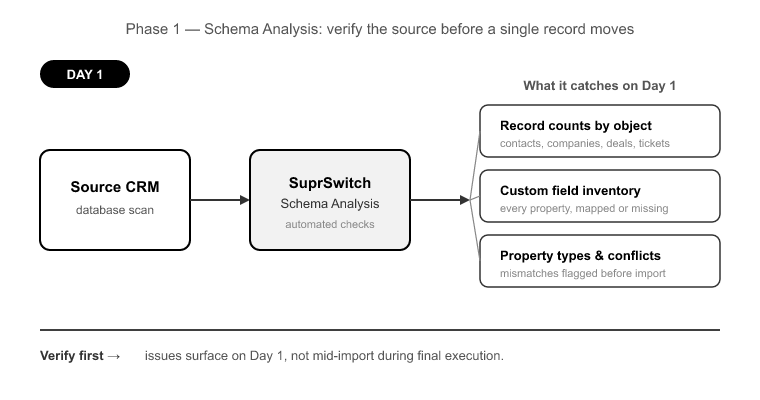
Half of a good migration checklist should be verified before a single record moves. This is the part most teams skip, because manual migrations don't have a natural place to do it. So problems surface mid-import instead.
In a SuprSwitch migration, this is Phase 1 Schema Analysis, and it runs on Day 1. SuprSwitch scans the source CRM database and surfaces the data quality issues that would otherwise blow up your final execution: record counts by object, custom field inventory, property type mismatches, duplicate records, empty required fields, and broken source-side associations. Nothing moves during this phase. It's discovery.
Four checklist items get verified here:
1. Record counts by object, not in aggregate. Not "how many records total" but how many contacts, companies, deals, tickets, and custom object records. Each is counted separately so you have a per-object baseline to validate against later.
2. Required-field gaps. HubSpot rejects records missing a required property. If your source has 800 contacts with no email address and email is a required property in your target portal, those 800 records fail.[2] A naive import discovers this as 800 failed rows mid-run. Schema analysis catches it on Day 1, while you can still decide whether to relax the requirement, backfill the field, or route those records differently.
3. Duplicate detection on the source. Two "Acme Corp" records in Salesforce become two "Acme Corp" records in HubSpot unless you catch them first. Finding duplicates before migration means you dedupe once, at the source, instead of untangling split associations after cutover.
4. Broken source associations. Some relationships are already broken in the source CRM before you touch anything. Migrating a broken association faithfully reproduces the breakage in HubSpot. Surfacing these on Day 1 lets you decide what to repair versus what to leave.
Association integrity: the checklist points most teams skip
If you only pressure-test one part of this crm migration checklist, make it this one. Associations are where migrations quietly fail.
5. Contact-to-company associations. Every contact that had a parent account in the source should have the equivalent company association in HubSpot. Verify by counting associations, not just records. A portal with 10,000 contacts and only 6,000 contact-company associations is telling you 4,000 contacts are orphaned.
6. Deal-to-contact and deal-to-company associations. A deal with no associated contact is a deal no rep can work. A deal with no associated company breaks account-level reporting. Both need explicit verification.
7. Ticket associations. If you're migrating Service Hub data, tickets need to stay attached to their contacts and companies, or your support team loses case history.
8. Association labels. HubSpot lets you label associations: "decision maker," "billing contact," "primary company." These carry business meaning. A migration that preserves the association but drops the label loses the context that made the association useful.
This is what SuprSwitch's association integrity mapping is built for: 1:1 relationship preservation between objects. During Phase 2 Mapping Logic on Day 2, association rules are defined explicitly, before any live data moves. The transformation layer maps how source relationships translate to the HubSpot data model. That includes object-type mismatches like Salesforce Leads, which have no native HubSpot equivalent and must map to Contacts, often with a defined lifecycle stage, sometimes to Contacts plus Companies.[3] Teams that don't decide this in the mapping phase discover it mid-import, when Lead-specific fields have nowhere to land.
Ownership, pipelines, and stages: the mapping decisions that break forecasting
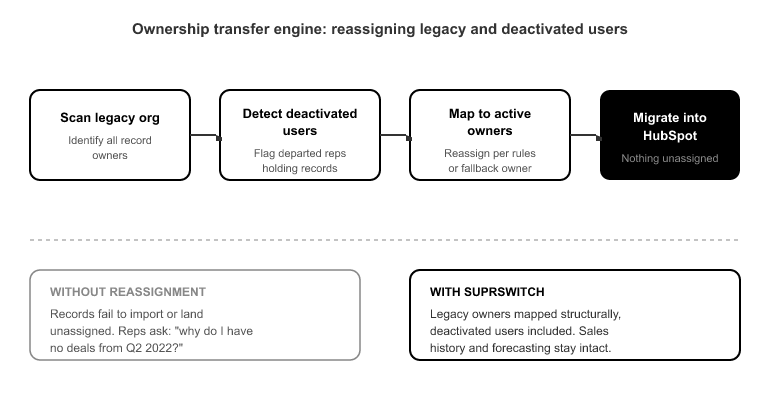
9. User ownership, including deactivated users. Every Salesforce or Pipedrive org that's been running for years carries records owned by people who left the company. If ownership isn't reassigned before migration, those records either fail to import or land unassigned, and no rep ever sees them. Sales history looks intact until a rep asks, "why do I have no deals from Q2 2022?"
SuprSwitch handles this structurally with the ownership transfer engine, which maps legacy owners, including deactivated users, to active users or a defined fallback owner during the mapping phase, before the migration runs. This turns a manual, error-prone reconciliation into a rule set you define and review up front.
10. Pipeline and deal stage mapping. This is where forecasting quietly breaks. Your source pipeline has 7 stages. Your HubSpot pipeline has 5. The mapping either collapses two stages into one, losing granularity, or, worse, dumps unmapped deals into the default first stage. Now every affected deal reports as early-stage, your forecast is wrong on day one, and nobody notices until the first pipeline review when the numbers don't match reality.
Stage mapping is a decision, not a default. It gets made in Phase 2 Mapping Logic, explicitly, deal stage by deal stage, so the probability-weighted forecast in HubSpot reflects the same pipeline reality it did in the source.
Activity history: what the object-model mismatch destroys
11. Activity and engagement history. This is the item that looks fine until a rep goes looking for a call they logged in 2022.
Salesforce splits activities into two objects: Tasks and Events. HubSpot uses one unified Activities model with typed engagements: calls, meetings, emails, notes.[4] A migration that doesn't handle that split does one of two bad things. It loses call and meeting history entirely, or it dumps everything into generic notes with no engagement typing and no timestamps preserved. Either way, three years of sales context evaporates.
Verifying this means checking that a call in the source is a call in HubSpot, a meeting is a meeting, and the timestamp on each engagement matches the original. Activity history sorted by the wrong date is nearly as useless as no history at all.
This is one of the things Phase 3 Pilot Validation exists to catch. On Day 2–3, SuprSwitch migrates a representative sample into HubSpot to validate relational integrity, activity history formatting, field-level truncation, and association chains, before the full dataset runs. Field truncation is a real risk here too. HubSpot has character limits and specific property types, so a source free-text field longer than the target limit truncates silently, while a source picklist value not present in the HubSpot property gets dropped. The pilot is where these surface. Issues found in pilot get fixed in the mapping layer, not discovered post-migration in a support ticket.
Deduplication and the re-import trap
12. Deduplication strategy and stable dedupe keys. The classic way to double your record count is to re-run a failed import. Partial failure, restart the whole job, and every record that succeeded the first time imports again. Now you have two of everything, associations split across both copies, and reps working from the wrong record.
Two things prevent this. First, a stable dedupe key, email for contacts, domain for companies, so re-processing a record updates the existing one instead of creating a new one. Second, retrying at the record level instead of restarting the full job.
SuprSwitch's retry mechanism does exactly that: failed records are automatically retried without restarting the full migration. This directly avoids the re-import-everything pattern that multiplies records, because the job never re-processes records that already succeeded. It retries only the ones that failed.
Rollback readiness: defining "broken enough to reverse" before you cut over
The final thing to verify isn't a data point. It's a plan. Teams treat go-live as irreversible, so when something breaks post-cutover, there's no clean state to return to and no defined criteria for what "broken enough to roll back" even means.
Rollback readiness has three parts. Keep the source CRM in read-only state after cutover, so you always have a clean, unmodified reference. Do not decommission it on go-live day. Define reversal criteria in advance: what failure threshold triggers a rollback versus an in-place fix? A 2% association failure you can patch is not the same as a pipeline mapping error corrupting every forecast. And define go-live sign-off explicitly: who confirms, against which validations, that the cutover holds.
This is where Phase 4 Final Execution and real-time record validation change the equation. When the full dataset runs through the migration engine, SuprSwitch validates every record in real-time. If a record doesn't appear in HubSpot within the expected window, it flags the failure during transfer, not three weeks later in a support ticket. Go-live sign-off becomes "confirmed record by record" instead of "we hope it worked." For the IT and security side of the checklist, SuprSwitch's no-storage architecture means customer data is never held on SuprSwitch servers. The data moves from source to target without being retained in between.
Conclusion
Go-live isn't the finish line. It's the gate, and the whole point of a crm migration checklist is to make sure you don't walk through it blind. Matching record counts prove volume moved. They say nothing about whether associations survived, ownership reassigned, stages mapped, or activity history landed with its timestamps intact. Those are the twelve things that actually decide whether the migration holds.
The teams that get burned are the ones who treat validation as a post-migration cleanup task. By then, the failures are already live, reps are already working from broken records, and every fix is a production change. The teams that get it right move the discovery work to the front: schema analysis on Day 1, mapping decisions on Day 2, pilot validation before full execution. Most of this checklist is verified before live data ever moves.
That's the entire design principle behind SuprSwitch's four-phase process. Front-load the discovery, validate the mapping on a pilot, and confirm every record in real-time during final execution. Run the checklist against that structure and go-live stops being a moment you hope survives. It becomes a gate you've already verified you can pass.
References
- Salesforce Developer Documentation, "Data Migration Best Practices: Relationship and Association Integrity," Salesforce Architect Guides, 2023.
- HubSpot Knowledge Base, "Set and edit required properties for records," HubSpot Help Center, 2024.
- HubSpot Developer Documentation, "Understanding the CRM Object Model and Object-Type Mapping," HubSpot Developers, 2024.
- HubSpot Knowledge Base, "Log and manage activities (calls, meetings, emails, notes) on records," HubSpot Help Center, 2024.
- RevOps Co-op, "Why CRM Migrations Overrun: A Survey of Implementation Timelines," RevOps Benchmark Report, 2023.
Don't go live on a migration you can't verify.
SuprSwitch validates every record in real-time association integrity, ownership transfer, and pipeline mapping checked before go-live. Catch the failures on Day 2, not in a support ticket three weeks later..