
.webp?width=130&height=24&name=SuprConfig%20(2).webp)





 Book a migration call






Pipedrive to HubSpot Migration: A Complete Guide to Moving Your CRM Data
-
Ujjwal

- Date: August 17, 2026
- 17 min read
Here's the thing nobody tells you before your first migration: the tool doesn't fix your data. It moves it. Faithfully. That includes every duplicate, every orphaned association, and every record owned by a rep who left in 2021. If you point a migration engine at a dirty CRM, you don't get a clean HubSpot instance. You get the same mess, restructured into a data model that exposes it faster and multiplies it along the way.
I've run more than 120 migrations, and the single biggest predictor of whether one goes smoothly isn't record volume or object complexity. It's crm data quality before migration begins. A 400,000-record Salesforce org with clean associations migrates in 3 to 4 days. A 40,000-record org riddled with duplicate companies and deactivated-user ownership can burn three weeks in cleanup. Not because the migration engine is slow, but because you're reconciling problems in HubSpot that should have been resolved at the source.
This post is about that cleanup work: what to do, why it matters, and exactly where SuprSwitch surfaces the problems versus where you have to fix them yourself.
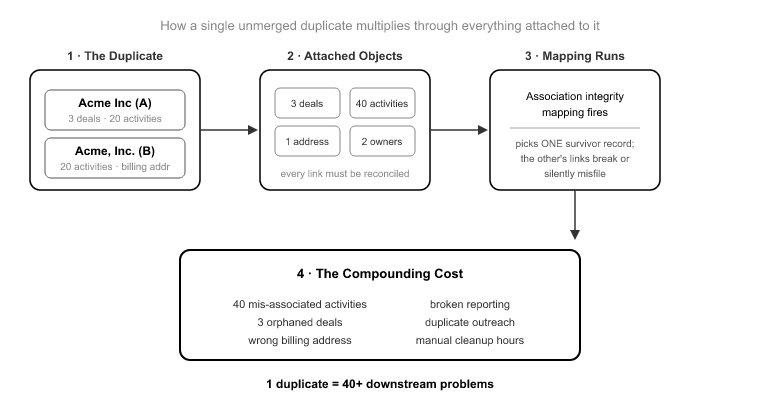
Let's start with the failure mode most people underestimate. You look at your source CRM and see two records for "Acme Inc." You think: that's two problems, I'll merge them later. Wrong. That single duplicate is a reconciliation problem that scales with everything attached to it.
Say "Acme Inc" (record A) has 3 open deals and 20 activities, and "Acme, Inc." (record B) has 0 deals but 20 different activities and the correct billing address. When association integrity mapping runs, it doesn't guess which twin is the real Acme. It preserves the relationships exactly as they exist in the source. So you land in HubSpot with two company records, three deals attached to one, forty activities split across both, and a sales rep who now sees half the call history on each.
That's not one cleanup item. That's a 44-object reconciliation problem: 2 companies, 3 deals, 40 activities, all fractured across a relationship graph that used to make sense in one place. Multiply that across the 10 to 20% duplicate rate common in un-deduplicated B2B CRMs[1], and company-level duplicates are usually worse because of naming variations. "Acme Inc", "Acme, Inc.", and "Acme Incorporated" all read as distinct records to a migration engine.
Here's the honest core of it: SuprSwitch preserves association integrity faithfully. That's the feature. That's also exactly why source duplicates have to be resolved before the migration runs. The tool won't invent a correct relationship you never had, and it won't silently pick a winner between two duplicate parents.
Four failure modes account for the overwhelming majority of migration cleanup pain. Each one poisons something different downstream.
Duplicates compound during association mapping, as described above. Every deal, contact, and activity attached to the wrong twin creates a fractured relationship graph. Your reporting double-counts, your deal totals inflate, and your reps lose trust in the pipeline view on day one.
Orphaned associations migrate as broken associations. A contact pointing to a company ID that no longer exists in the source doesn't repair itself in transit. It lands in HubSpot as an orphan, and now your Company view is missing context that used to live somewhere. The migration didn't break the association, the source did, but you inherit the break.
Deactivated-user ownership creates dead records the moment they land. A record owned by a user who no longer exists in the source, and who won't be provisioned in HubSpot, arrives with no valid owner. It doesn't route. It doesn't trigger owner-based workflows. It doesn't appear in anyone's pipeline. At enterprise scale this can be 15 to 30% of your records[2].
Empty required fields either block the record from importing or force a garbage default value. HubSpot's data model has required properties. A source record with a null value in a field mapped to a required HubSpot property will fail, or get stuffed with a placeholder that then pollutes every filter, segment, and report you build afterward.
The deeper problem is that all of your downstream automation assumes the underlying records are trustworthy. Lead scoring, routing, workflows, segmentation, revenue reporting: every one of those is built on the record layer. Migrate dirty data and you don't have one problem. You have a broken foundation under every automation you build on top of it.
Here's the line I draw for every client, and it's the most important thing in this post. There is a difference between what SuprSwitch surfaces and what you have to fix at the source.
Phase 1, Schema Analysis runs on Day 1. SuprSwitch scans the source CRM database and identifies custom fields, record counts, property types, and data quality issues, including duplicates, broken associations, and empty required fields, before a single record moves. This is the moment your data quality problems become visible instead of arriving as surprises mid-migration. The tool tells you what's wrong before you've committed anything.
But surfacing is not fixing. Schema Analysis will show you that you have 4,200 duplicate contacts and 380 companies owned by deactivated users. It will not decide which duplicate is the real one, and it will not decide where orphaned-owner records should be reassigned. Those are business-rule and semantic decisions, and they belong to you, at the source, before Day 1.
What the tool does handle: transformation logic, association rules, property creation, and ownership routing all get defined in the Mapping Logic phase. What you handle: semantic deduplication and any judgment call about which record wins. Get that division right and the migration is predictable. Get it wrong and you're doing cleanup in production.
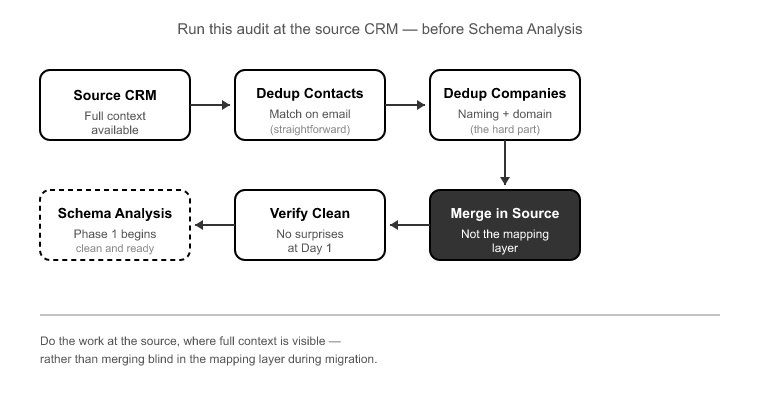
This is the practitioner checklist I run against every source CRM before Schema Analysis. Do this work at the source, and Day 1 confirms you're clean instead of handing you a list of surprises.
1. Dedup pass. Run deduplication at both the contact and company level. Contacts are usually matched on email. Companies are the hard part because of naming variation and domain inconsistencies. Merge in the source, where you can see the full context, not in the mapping layer where you're working blind.
2. Ownership reconciliation. Pull a list of every record owner and cross-reference against active users. Every owner who won't exist in HubSpot needs a resolution decision: reassign to an active owner, route to a queue, or flag for review. Do this before Phase 2, because that's where ownership transfer logic gets locked in.
3. Required-field completeness. Identify which source fields map to HubSpot required properties, then check for nulls. Decide whether to backfill at the source or define a mapping-layer default that isn't garbage. Never let placeholder values leak into a required field you'll report on later.
4. Association integrity check. Look for contacts pointing to company IDs that no longer exist, deals with no associated company, and activities referencing deleted records. These orphans migrate as orphans. Resolve them where the original relationship data still exists, in the source.
Of the four failure modes, deactivated-user ownership is the one that surprises people most, because it's invisible until go-live. Duplicates you can see. Orphaned associations show up in a scan. But an unowned record looks completely normal in a spreadsheet. It has a name, an email, a company. It just has no living owner.
A 400,000-record Salesforce org with five years of sales turnover routinely carries 20 to 40 deactivated users still listed as record owners[3]. Without ownership transfer logic resolved before migration, tens of thousands of records arrive in HubSpot unowned. They sit silently until the first owner-based workflow fails to fire, or a rep asks why a whole book of business isn't in anyone's pipeline.
SuprSwitch's ownership transfer engine resolves this in Phase 2, Mapping Logic. You decide, before Final Execution, where orphaned-owner records go: reassigned to an active owner, routed to a queue, or flagged for review. The decision is made and reviewed while nothing has moved yet, not discovered in a support ticket three weeks after go-live.
Even with a clean source, things slip through. That's why there are three layers of quality-catching before go-live, not one.
Schema Analysis (Phase 1) is the first net. It flags duplicates, broken associations, empty required fields, and record counts on Day 1, before commitment.
Pilot Validation (Phase 2 to 3) is the second net. A representative sample migrates to HubSpot to validate relational integrity, activity history formatting, field-level truncation, and association chains against the real production data model. Anything the audit missed surfaces here, and gets fixed in the mapping layer, not in post-migration cleanup. This is where the pilot migration earns its keep: you catch a truncated custom field or a broken association chain on a 500-record sample instead of on 400,000 live records.
Real-time record validation (Phase 4) is the last net. During Final Execution, every record is validated as it lands. If a record doesn't appear in HubSpot within the expected window, it flags immediately rather than letting you discover the gap later. Failures, usually data quality edge cases, hit the retry mechanism, which automatically re-attempts them without restarting the full job. With clean input, almost nothing reaches the retry queue. That's the whole point: the retry mechanism is a safety net, not a workflow.
One more architectural note that matters for the technical buyers reading this: SuprSwitch runs a no-storage architecture. Your customer data is never held on SuprSwitch servers. It moves from source to HubSpot without being retained in between. Data quality work happens against your systems, not a vendor's copy of them.
People assume crm migrations drag on for weeks because of data volume. They don't. Record count is a runtime problem, and the migration engine handles volume fine. What turns a 4-day migration into a 4-week one is manual field mapping and late-discovered association breaks: problems that surface after live data has already moved.
SuprSwitch compresses the timeline to 3 to 4 days by front-loading discovery. Schema Analysis on Day 1, Mapping Logic on Day 2, Pilot Validation on Day 2 to 3, Final Execution on Day 3 to 4. The reason that works is that discovery and validation happen before any live data moves. But that compression assumes one thing: that the source data is clean, or that the dirt has been surfaced and a resolution decided.
CRM data decays at roughly 22 to 30% per year as contacts change jobs, emails go dead, and companies get acquired[4]. A CRM that hasn't been actively maintained for three years can be 40% or more stale before you even count duplicates. That decay doesn't slow the migration engine. It slows the prep. And the prep is where migrations are actually won or lost.
So the equation is simple: clean input, predictable 3 to 4 day output. Dirty input, and the engine still runs in 3 to 4 days, but you've now got weeks of source-side prep or post-migration reconciliation bolted onto either end. The audit is what keeps the timeline honest.
The migration tool is not where data quality gets fixed. It's where unfixed data quality gets amplified. A duplicate company becomes a 44-object reconciliation problem. A deactivated-user record becomes an unroutable dead weight. An orphaned association migrates as an orphan. None of that is the engine's fault. It's doing exactly what you told it to, against exactly what you pointed it at.
The good news is that SuprSwitch is built to make the problem visible before it becomes expensive. Schema Analysis on Day 1 tells you what's dirty before you commit a record. Pilot Validation catches what the audit missed. Real-time record validation and the retry mechanism guard Final Execution. Three nets, all before go-live. But the tool surfaces problems. It doesn't make your business-rule decisions for you.
So do the audit first. Dedup at the source. Reconcile ownership. Check required fields and association integrity. Get crm data quality before migration to a place you trust, and the 3 to 4 day timeline holds. Skip it, and you'll spend the time you saved cleaning up in production, which is the one place cleanup should never happen.
Before migration. Resolve duplicates, broken associations, ownership issues, and missing required data at the source. SuprSwitch identifies these issues during Schema Analysis so they can be addressed before data moves.
Not completely. A migration tool can identify duplicates, but deciding which record to keep requires business context. SuprSwitch surfaces duplicate records, while deduplication decisions are made at the source.
Broken associations can remain broken after migration because the migration preserves the source relationships. SuprSwitch identifies these issues before migration so they can be resolved before they affect the destination CRM.
They need to be reassigned, routed, or flagged before migration. SuprSwitch’s ownership transfer engine lets you define how these records should be handled before they reach the destination CRM.
Poor data quality can extend pre-migration preparation and post-migration reconciliation. SuprSwitch surfaces data issues early, helping teams resolve them before migration and keep execution predictable.
SuprSwitch flags duplicates, broken associations, and ownership gaps on Day 1 before a single record moves into HubSpot.

Discover ideas, strategies, and expertise to help you streamline operations, improve customer experiences, and accelerate growth.