
.webp?width=130&height=24&name=SuprConfig%20(2).webp)





 Book a migration call






Pipedrive to HubSpot Migration: A Complete Guide to Moving Your CRM Data
-
Ujjwal

- Date: August 17, 2026
- 17 min read
A Copper-to-HubSpot migration looks like the easy one. The orgs are small, everything lives in Google Workspace, and the object count is manageable. Then you run the export and find something else. That 40,000-contact Copper org is really 27,000 real people and 13,000 auto-created ghosts: vendors, one-off inbound emails, and personal Gmail addresses Copper created the moment a message hit an inbox. That's the trap. The feature that makes Copper convenient day to day, automatic record creation from Gmail activity, is exactly what pollutes your new HubSpot instance and inflates your contact tier bill on import.
The other two landmines are Copper's separate Leads object and its heavy use of Tags for segmentation. Neither has a clean HubSpot equivalent. Migrate them blind and you lose years of qualification logic and segmentation in a single afternoon. The real work in a copper crm to hubspot migration isn't moving volume. It's reconciling the data model and stripping out the noise before anything transfers. Done right, with a proper discovery phase, this is a 3 to 4 day job, not a three-week cleanup project.[1]
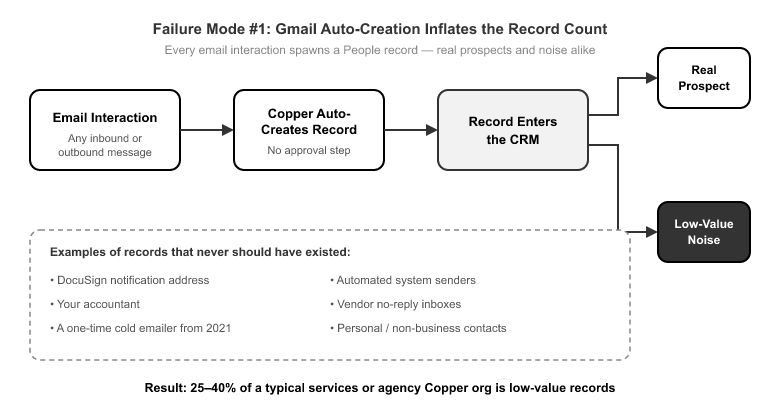
Three failure modes account for nearly every bad Copper migration I've seen. None of them are about record volume.
Gmail auto-creation inflates the record count. Copper creates a People record the moment an email interaction happens. That's helpful when you're capturing a real prospect. It's a disaster when it captures the DocuSign notification address, your accountant, and the guy who cold-emailed you once in 2021. A typical services or agency Copper org carries 25 to 40% low-value records.[2] Migrate those blind and you don't just clutter HubSpot, you pay for the privilege, since HubSpot's marketing contact tiers price on volume.[3]
Copper Leads have no clean HubSpot home. Copper carries a separate Leads object that behaves differently from People. It's a pre-qualification holding area. HubSpot's data model has no object that works the same way. Teams either flatten the distinction by dumping everything into Contacts, or they lose the Lead records entirely. Both outcomes destroy the qualification stage that Copper users built their pipeline around.
Tags don't translate. Copper runs its segmentation on Tags. HubSpot has no native contact-tag system. It uses properties and active lists instead. Migrate Tags without an explicit mapping decision and they simply vanish, taking your entire segmentation logic with them. This is the single most common "where did my lists go?" panic ticket after a DIY Copper migration.
Two more bite less often but hurt just as much: Copper's Connect fields (the relationship links between records) and the Projects object have no default HubSpot counterpart. Without an explicit custom-object decision, those relationships orphan on import.
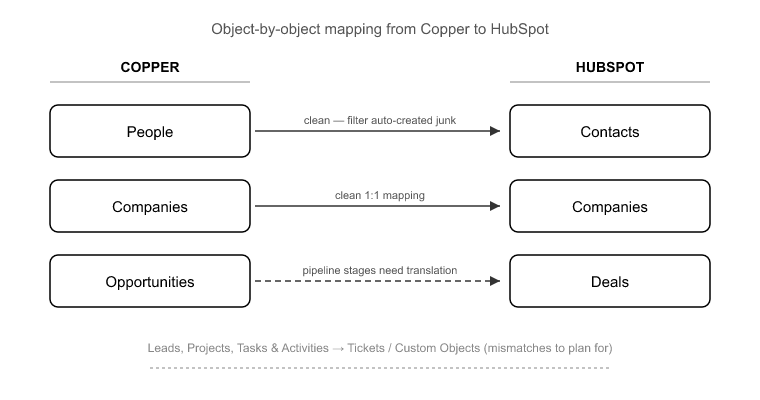
Before you map anything, you need to know which objects translate cleanly and which are the mismatches. Copper's core objects are People, Companies, Opportunities, Leads, Projects, Tasks, and Activities. HubSpot's targets are Contacts, Companies, Deals, Tickets, and Custom Objects.
Here's how they line up:
The Opportunities-to-Deals map is the one people worry about, and it's actually the straightforward part. It's Leads and Projects, the objects HubSpot doesn't have, that need real thought. This is exactly where SuprSwitch's contextual object mapping earns its place. Instead of dumping Copper Leads into Contacts with no logic, you define conversion rules up front. A Lead becomes a Contact with a specific lifecycle stage, or a Lead becomes a Contact plus an associated Company. That way the qualification distinction survives the move.
This section matters more for a copper crm to hubspot migration than for any Salesforce or Pipedrive job I've run. Because Copper auto-creates a Person from Gmail activity, your record count is fiction until someone audits it.
This is where SuprSwitch's Schema Analysis, in Phase 1 on Day 1, does the heavy lifting. Before a single record moves, SuprSwitch scans the Copper source database and surfaces the actual state of your data: real record counts versus auto-created duplicates, empty-required-field records, and broken associations. This is where the "your 40,000 contacts are really 27,000 real people" conversation happens, with data behind it instead of a guess.
Once you can see the duplicate rate and the auto-created cohort, you make a deliberate decision about what moves. Maybe you migrate only People with a logged Opportunity or a manual Tag. Maybe you set a last-activity threshold. The point is you decide before the migration runs, not after you've already polluted HubSpot and started paying for it.
One hard rule: do not try to re-sync historical Gmail threads through the migration. Historical logged emails migrate as engagement records. Going forward, HubSpot's own Gmail integration takes over. Teams that don't separate "historical activity migration" from "go-forward sync setup" end up double-logging every email, once from the migration and once from the new integration. Keep those two workstreams apart.
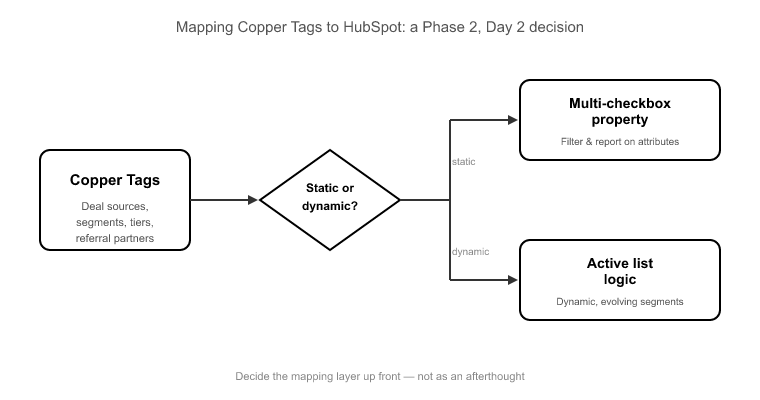
Tags are where Copper users have quietly encoded years of business logic: deal sources, industry segments, referral partners, service tiers. HubSpot doesn't have tags, so the translation is a mapping-layer decision made in Phase 2 on Day 2, not an afterthought.
You have two sensible targets for Copper Tags in HubSpot:
The right choice depends on how each tag is actually used, which is why this gets defined and reviewed before execution rather than improvised mid-run. SuprSwitch's mapping logic is where you set that translation, so every Copper Tag lands in a known HubSpot property instead of evaporating.
Copper's Connect fields, the relationship links between records, get handled by SuprSwitch's association integrity mapping. Those relationships translate into native HubSpot associations, preserving the People↔Companies↔Opportunities chains rather than orphaning the links on import. Custom fields map to custom properties created in HubSpot during the same phase, with property types matched so a Copper dropdown doesn't land as free text.
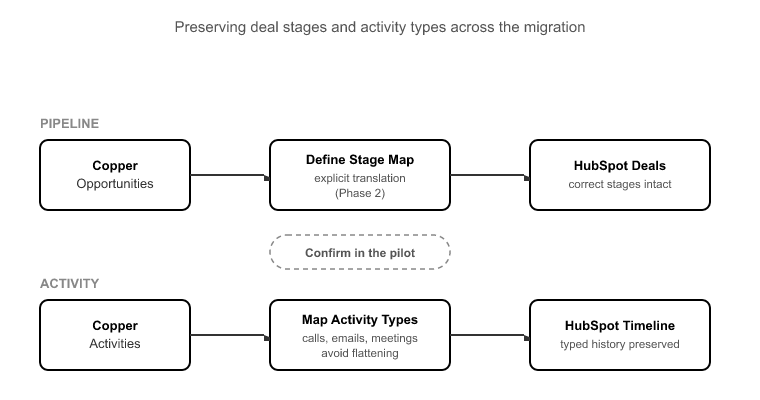
Two things break most often in the pipeline-and-history layer: deal stages that don't match, and activities that flatten into generic Notes.
On the pipeline side, Copper Opportunities map to HubSpot Deals cleanly, but your Opportunity stages need an explicit translation to HubSpot deal stages. Skip this and every deal lands in the default stage, destroying your forecast and any historical stage-based reporting. Define the stage map in Phase 2 and confirm it in the pilot.
On the activity side, Copper stores Emails, Calls, Meetings, Notes, and Tasks as distinct activity types tied to Gmail and Calendar. HubSpot has matching engagement types: Calls, Emails, Meetings, Notes, and Tasks. The trap is that a lazy mapping collapses everything into Notes, so your reps lose their call and meeting timelines and your activity reporting goes dark. A 1:1 activity-type map has to be defined explicitly. Copper Calls become HubSpot Call engagements, and Copper Meetings become Meeting engagements. That's the difference between a migration that preserves a rep's timeline and one that erases it.
Most Copper migrations that drag on for weeks aren't slow because of data volume. Copper orgs are usually 5,000 to 50,000 records.[4] They're slow because of manual field mapping and broken associations discovered halfway through. SuprSwitch front-loads that discovery so the whole job runs in 3 to 4 days across four phases.
Phase 1, Schema Analysis (Day 1). SuprSwitch scans the Copper source and reports custom fields, real record counts, and data quality issues: auto-created duplicates, empty-required-field records, and broken associations. Nothing moves. This is where you decide what's worth migrating.
Phase 2, Mapping Logic (Day 2). The transformation layer maps Copper objects to the HubSpot data model. Custom properties get created, Tag translations get defined, association rules get set, and Lead conversion logic gets specified. The ownership transfer engine resolves deactivated-Copper-user gaps here, reassigning records owned by departed reps before the migration runs, so ownership doesn't orphan. Everything is reviewed before the first record moves.
Phase 3, Pilot Validation (Day 2 to 3). A representative sample migrates into HubSpot so you can confirm the mapping actually holds: calls stayed calls, Tags landed in the chosen property, deal stages translated correctly, and association chains held. Issues found here get fixed in the mapping layer, not in a post-migration cleanup project. The pilot migration is the single biggest risk reducer in the whole process.
Phase 4, Final Execution (Day 3 to 4). The full dataset runs through SuprSwitch's migration engine. Real-time record validation flags any record that doesn't land in HubSpot within the expected window, so you find out during the transfer, not three weeks later in a support ticket. The retry mechanism automatically re-runs failed records without restarting the entire job. Every record is validated post-migration before go-live is confirmed.
For the IT and technical buyers scoping this: SuprSwitch uses a no-storage architecture. Your Copper data is never held on SuprSwitch servers. It moves from source to HubSpot through the transformation layer without being retained.
The Copper migration that goes wrong isn't the one with too many records. It's the one where nobody audited the auto-created duplicates, nobody decided what happens to Leads, and nobody planned where Tags would land. All three are discovery problems, and all three are solvable before a single record moves.
That's the whole argument for front-loading the work. When Schema Analysis runs on Day 1 and mapping logic is reviewed on Day 2, the actual data transfer becomes the boring, predictable part: validated in real time, retried automatically on failure, and confirmed record by record before go-live. A copper crm to hubspot migration handled this way is a 3 to 4 day project with no cleanup tail, not a month of chasing broken associations and rebuilding lost segments.
Start with the record count you can actually trust. Once you know how many of your Copper contacts are real, every other decision, what moves, what maps where, what gets left behind, gets easier to make.
A Copper CRM to HubSpot migration starts with data auditing, object mapping, field and Tag mapping, association checks, and pilot validation. SuprSwitch by SuprDense manages these stages before executing the final data migration.
Copper Leads are mapped to HubSpot Contacts using contextual object mapping. SuprSwitch by SuprDense can preserve qualification context by applying the appropriate lifecycle stage and Company association during migration.
Copper Tags are mapped to HubSpot properties or active lists based on how they are used for segmentation. SuprSwitch by SuprDense defines and validates the mapping before migration to preserve your existing segmentation logic.
Yes. Copper emails, calls, meetings, notes, and tasks can be mapped to their corresponding HubSpot engagement types. SuprSwitch by SuprDense validates the activity mapping during the pilot migration to preserve historical activity.
A Copper CRM to HubSpot data migration typically takes 3–4 days with SuprSwitch by SuprDense, covering schema analysis, mapping, pilot validation, and final execution. The timeline depends on the complexity and requirements of your Copper data.
SuprSwitch maps pipelines, activities, and Google Workspace contacts with real-time validation full migration in 3–4 days.

Discover ideas, strategies, and expertise to help you streamline operations, improve customer experiences, and accelerate growth.