.webp?width=130&height=24&name=SuprConfig%20(2).webp)





 Book a migration call






Here's the failure mode I see most often. A team migrates a Salesforce org into HubSpot, the record counts look right, everyone signs off. Three weeks later a sales rep opens an account and finds two versions of the same company, each holding a different half of the deal history. Nobody knows which record is real. The rep emails a dead address because it "won" the merge. The forecast is off because deals got counted twice. This didn't happen because the migration engine failed. It happened because the duplicates sitting quietly in the source CRM got carried across, and then multiplied.
CRM deduplication before migration is not a cleanup task you tack on afterward. It's a Phase 1 decision that determines whether your association chains survive the move. Duplicates don't transfer one-to-one and land as a tidy pile of extra records you can delete later. They fracture the relationships between contacts, companies, deals, and activities. Untangling that after the fact costs 5 to 8 times what it costs to merge in the source while the associations are still intact.[2]
This is the case for treating deduplication as the first thing you do, not the last. Let me walk through why duplicates compound, which duplicate types actually cause damage, and how to sequence the merge work so it fits inside a 3 to 4 day migration instead of blowing up into a six-week cleanup project.
Why Duplicates Multiply Instead of Transferring 1:1
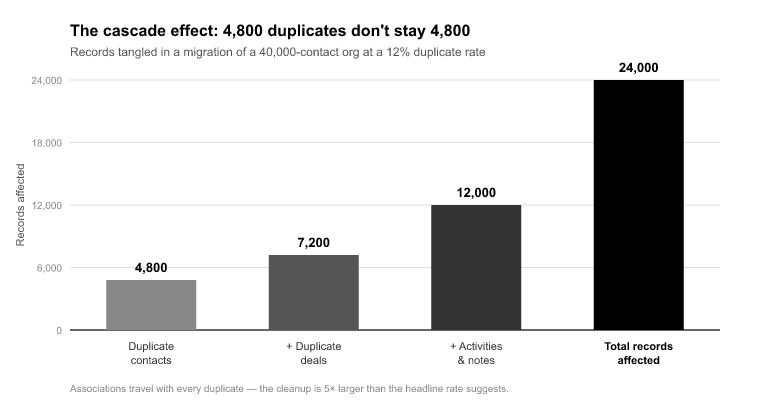
The intuition most people have is wrong. They assume a 12% duplicate rate means 12% too many contacts land in HubSpot. Annoying, but a delete-a-few-hundred-records problem. The reality is worse, because contacts don't live in isolation. They carry associations.
Take a 40,000-contact org with a 12% duplicate contact rate, right in the middle of the 10 to 30% range that's typical for CRMs running 3 or more years without governance.[1] That's 4,800 duplicate contacts. If each duplicate averages 1.4 associated deals, a conservative number for a mature sales org, you're not importing 4,800 extra contacts. You're importing 4,800 contacts plus roughly 6,700 deal associations that are now split across paired records.
Here's the part that breaks things. "Bob Smith" holds the deal from 2022 and the early call notes. "Robert Smith" holds the 2024 renewal and the recent emails. Neither record is complete. When both land in HubSpot as separate contacts, the deal timeline is fragmented across two identities, the activity history is split, and the rep working the account has no single view. The duplication didn't stay contained to the contact object. It corrupted the relational integrity of everything attached to it.
That's why deduplication has to happen before the association chains are mapped. Once you've resolved the duplicate in the source, the surviving record inherits the correct, consolidated set of relationships. SuprSwitch's association integrity mapping then preserves those 1:1 relationships on transfer. The merged contact carries its deals, companies, and activity history into HubSpot intact. But that only works if the merge happened first. Map associations against a duplicated source and you've just mapped the fracture.
The Four Duplicate Types That Actually Cause Damage
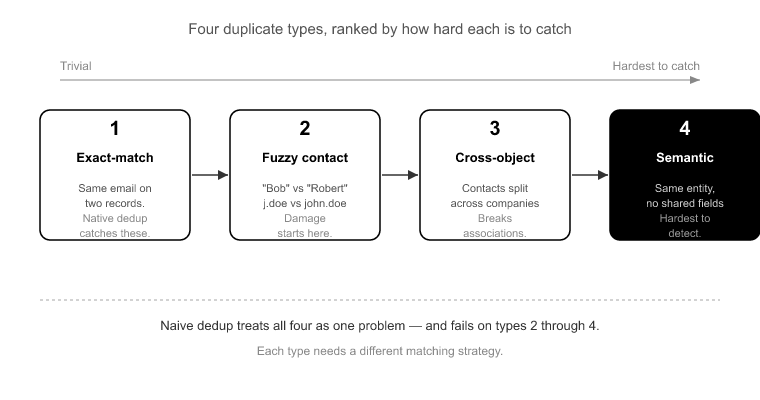
"Duplicate" is not one problem, and treating it as one is how naive dedup fails. There are four distinct types, ranked here by how hard each is to catch.
Exact-match duplicates are trivial. Same email address on two contact records. Every dedup tool catches these, including HubSpot's native deduplication. If this were the whole problem, you wouldn't need to think about it.
Fuzzy contact duplicates are where the damage starts. "Bob Smith" vs "Robert Smith." "j.doe@acme.com" vs "john.doe@acme.com." Same human, different strings. Email-based dedup never touches these because the emails genuinely differ. They survive a naive pass and land in HubSpot as two people.
Fuzzy company duplicates are the worst offender for account-based teams. "Acme, Inc.," "Acme Inc" with no comma, and a company record keyed on "acme.com." That's three separate company records, each holding a subset of the contacts and deals. HubSpot's native dedup works on domain, so if the domain formats differ or one record has no domain at all, it does nothing.[2] Your reps get three partial views of one account and no way to know they're looking at the same company.
Split-ownership duplicates hide in plain sight. The same account exists twice, once owned by a rep who left the company eighteen months ago, once owned by the active rep who inherited the territory. They look like two legitimate records because they have two different owners. They're the same account, and if you don't catch them before mapping, they compound your ownership-transfer logic.
The point is that exact-match dedup, the kind that runs automatically, solves the easy 20% and leaves the 80% that actually breaks your crm migration. You need to surface the fuzzy and split-ownership cases before anything moves, with a full picture of the source data.
Deduplicate at the Source, Not in HubSpot
The single most expensive decision you can make is deferring deduplication until after the data lands in HubSpot. I understand the temptation. The migration feels like the hard part, and dedup feels like tidying up afterward. It's backward.
Merging a duplicate pair in the source CRM is one operation. You pick a survivor, define which fields win, and the associations consolidate onto the surviving record. Done.
Merging the same pair in a live HubSpot portal after import means re-associating deals, re-parenting activities, checking whether the merge triggers workflow enrollment, and re-validating your reporting, all under the pressure of a production system your sales team is actively using. That's 5 to 8 times the effort per record, and it carries live-system risk the source merge doesn't.[2] Merge two contacts in HubSpot and you can re-fire workflow enrollment, re-send an automated email, or skew quarter-to-date reporting mid-quarter.
HubSpot's native dedup makes this worse, not better, because it lulls people into thinking it's handled. It works on email and domain, so it catches your trivial exact-match cases and completely misses the fuzzy company and deal duplicates that cause the real damage. You "deduplicate in HubSpot," feel done, and still have three Acme records.
This is exactly why SuprSwitch's Phase 1 Schema Analysis runs before a single record moves. It scans the source database and surfaces the full duplicate picture, including the fuzzy and split-ownership cases native tooling never flags, so your merge decisions get made against complete information. Nothing moves on Day 1. You're looking at the whole board before you touch a piece.
Survivorship Rules: Deciding Which Record Wins
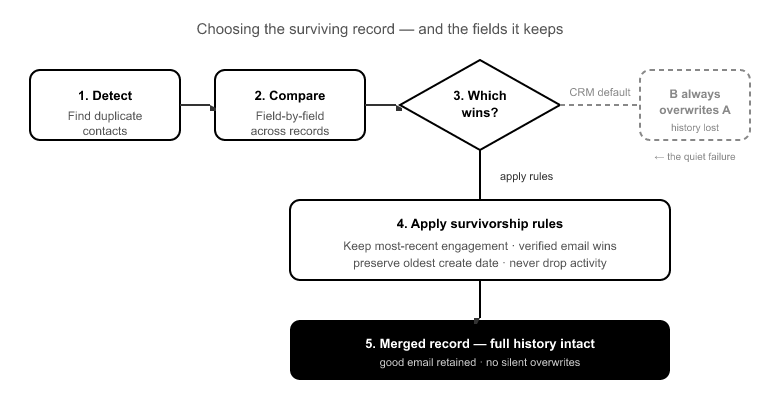
Once you know what's duplicated, you have to decide which record survives and which fields it keeps. This is where migrations quietly destroy history, and it's worth being precise.
Most CRMs, when you merge Contact A into Contact B, let B's data win on any field conflict. That's fine if B is the good record. But if B is the stale one, you just overwrote three years of engagement history and kept a dead email address. Reps don't discover this until a deal goes cold on an address that bounced.
You need explicit survivorship rules, defined field by field, before you merge. The three strategies I use, in order of how often they apply:
Most-recent-engagement wins for behavioral and contact fields like email, phone, and last activity. The record that's been touched most recently almost always holds the current truth. This is your default for anything a rep acts on.
Most-complete wins for descriptive fields like job title, industry, and custom properties. Between two records, keep the value that's populated over the one that's blank, regardless of which record is "primary."
Owner-priority wins for ownership and territory fields, resolved in favor of the active owner over a deactivated one. This ties directly into split-ownership handling below.
Define these before you migrate. SuprSwitch flags the duplicates and enforces your survivorship logic consistently across the dataset, but it does not auto-decide survivorship for you. That's deliberate. The merge strategy is a business decision, not something a tool should guess. What SuprSwitch does is make the duplicates visible in Phase 1 and apply your rules uniformly in the mapping layer, so record 4,000 gets merged the same way record 40 did.
Handling Split Ownership and Deactivated Users
Split-ownership duplicates deserve their own treatment because they interact with the hardest part of any migration: ownership transfer.
When a rep leaves, their records don't reassign themselves. In a CRM that's run for years, you accumulate accounts owned by deactivated users sitting next to duplicate versions of the same accounts owned by active reps. If you migrate without resolving this, you get two problems stacked on each other, a duplicate and an ownership gap, because HubSpot has no active user to assign the deactivated-user record to.
The sequence matters. You resolve the duplicate first, merging the deactivated-user record into the active-owner record with owner-priority survivorship, and then ownership transfer runs cleanly against a single, correctly-owned record. Do it in the other order and you're transferring ownership of records you're about to merge, which is wasted work and a source of error.
SuprSwitch's ownership transfer engine handles the ownership-gap logic in the mapping phase. Where a duplicate is split across a departed rep and an active one, the surviving record lands under the correct active owner in HubSpot. The deactivated-user gap gets resolved as part of the merge, not discovered as an orphaned-record problem after go-live.
Validating the Merge Before You Trust It
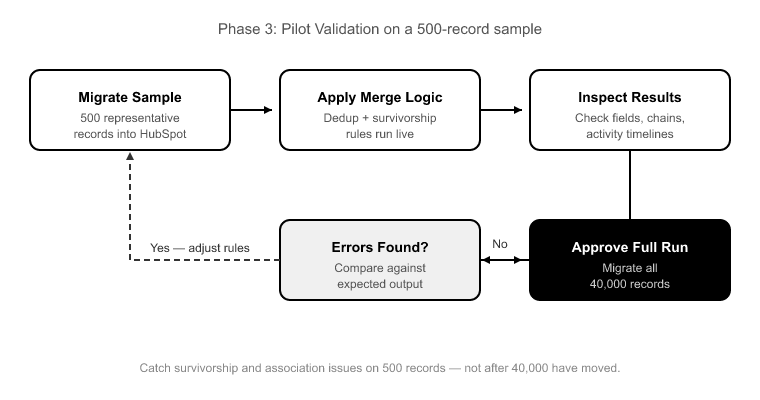
The mistake here is trusting your dedup logic because it looked right in a spreadsheet. Merge logic that's correct in theory can still land wrong. A survivorship rule applies to a field you didn't anticipate, an association chain doesn't reattach, an activity timeline comes across truncated. You want to find that on a sample of 500 records, not after 40,000 have moved.
That's what Phase 3 Pilot Validation is for. Before the full run, SuprSwitch migrates a representative sample into HubSpot so you can confirm the merged records landed with the right survivorship data: correct email, complete activity timeline, intact associations. If a merged contact shows up missing its pre-merge deal history, you fix it in the mapping layer and re-run the pilot. You do not discover it in production.
Then during Phase 4 Final Execution, real-time record validation confirms the result at scale. Every record is validated as it lands. If a merged record doesn't appear in HubSpot within the expected window, it flags immediately, and the retry mechanism re-runs failed records without restarting the whole job. You confirm your deduped dataset before go-live, not in a support ticket weeks later.
One more thing worth stating plainly: SuprSwitch operates on a no-storage architecture, so your customer data is never held on SuprSwitch servers. The dedup and validation work happens in transit between source and HubSpot, which matters when the records you're merging include everything your business knows about its customers.
Where CRM Deduplication Before Migration Fits in the 4-Phase Sequence
Here's the whole thing in order, because sequencing is what makes CRM deduplication before migration cheap instead of catastrophic.
Phase 1, Schema Analysis (Day 1) : SuprSwitch scans the source CRM and surfaces custom fields, record counts, and data-quality issues including your full duplicate picture. This is where you see the fuzzy company duplicates and split-ownership cases native tooling misses. Nothing moves.
Phase 2, Mapping Logic (Day 2) : You define survivorship rules and SuprSwitch maps source objects to the HubSpot data model, creates custom properties, sets association rules, and configures ownership-transfer logic. Your merge strategy is encoded here and applied consistently.
Phase 3, Pilot Validation (Day 2 to 3) : A representative sample migrates so you validate that merged records landed with correct survivorship, intact association chains, and complete activity history. Issues get fixed in the mapping layer.
Phase 4, Final Execution (Day 3 to 4) : The full deduped dataset runs through the migration engine with real-time record validation on every record. Go-live is confirmed only after validation passes.
The reason most migrations drag to 3 to 6 weeks isn't data volume. It's duplicates and broken associations discovered mid-run, forcing a stop-fix-restart cycle.[3] SuprSwitch moves that discovery to Day 1 and 2, before live data moves, which is exactly why deduplication done this way doesn't add weeks. It's already inside the 3 to 4 day window.
Conclusion
Duplicates are not a cosmetic problem you clean up after the fact. They're a relational-integrity problem, and the relationships are exactly what a migration moves. A 12% duplicate rate isn't 12% extra records. It's thousands of fractured deal associations and split activity timelines that turn a clean migration into a live-portal cleanup project measured in weeks.
The fix is sequencing. Surface the full duplicate picture on Day 1, define your survivorship rules before anything moves, resolve split-ownership and deactivated-user cases before ownership transfer runs, and validate the result on a pilot sample before the full execution. Done in that order, CRM deduplication before migration costs a fraction of what it costs to untangle the same duplicates in production, and it fits inside the same 3 to 4 day window instead of stretching your project into a month.
SuprSwitch doesn't make dedup effortless. The merge strategy is still yours to define, and defining it well takes judgment. What it does is make the duplicates visible before they can multiply, enforce your rules consistently across the whole dataset, and validate every record as it lands. That's the difference between a migration you sign off on with confidence and one you find out was broken three weeks later, in a support ticket.
Frequently Asked Questions
Should I deduplicate in my source CRM or in HubSpot after import?
In the source, before migration. Merging a duplicate pair in the source is one operation. Merging the same pair in a live HubSpot portal means re-associating deals, re-parenting activities, checking workflow enrollment, and re-validating reporting, 5 to 8 times the effort per record, done under production risk.[2] HubSpot's native dedup only handles email and domain, so it won't catch the fuzzy company and deal duplicates that cause the real damage anyway.
Does SuprSwitch automatically merge duplicate records for me?
SuprSwitch identifies duplicate records during Phase 1: Schema Analysis and applies your defined merge and survivorship rules consistently across the dataset. Which record to retain and which field values should take priority remains a business decision. SuprSwitch surfaces duplicates early and applies your rules uniformly, ensuring record 40,000 follows the same logic as record 40.
How do I handle fuzzy duplicates that HubSpot's native dedup won't catch?
Fuzzy company-name variants like "Acme, Inc." vs "Acme Inc" and deal-name duplicates get surfaced during Phase 1 Schema Analysis, which scans the source database rather than relying on email or domain matching. You resolve them in the source and encode the merge in the mapping layer before import, so they never land in HubSpot as separate records in the first place.
What happens to activity history when I merge two contacts?
It depends entirely on your survivorship rules, which is why you define them before merging. The risk is overwriting a complete timeline with a stale record's data. Once the merge is defined correctly, SuprSwitch's association integrity mapping preserves the surviving record's consolidated activity history on transfer, so the merged contact lands in HubSpot with its full timeline intact rather than fragmented across two identities.
Will deduplicating add weeks to my migration timeline?
No. Deduplication is Day 1 Schema Analysis work. It happens before any live data moves, which is precisely why it doesn't extend the timeline. The full migration still completes in 3 to 4 days. What blows timelines out to weeks is discovering duplicates and broken associations mid-run and being forced into a stop-fix-restart cycle.[3] Doing the discovery on Day 1 prevents that.
How do I know the dedup worked after migration?
Two checkpoints. Phase 3 Pilot Validation confirms merged records land with correct survivorship and intact associations on a real sample before the full run. Then during Phase 4, real-time record validation confirms every record as it lands. If a merged record doesn't appear within the expected window, it flags immediately and the retry mechanism re-runs it. You verify record counts and association integrity before go-live is confirmed.
References
- Validity, "The State of CRM Data Management," industry analysis reporting duplicate and decaying-data rates of 10 to 30% in CRM systems operating without ongoing data governance.
- HubSpot Knowledge Base, "Deduplicate contacts, companies, deals, and tickets," documentation of native email- and domain-based deduplication limits and merge behavior in production portals.
- Gartner, "Improve Data Quality to Reduce CRM Migration Risk," research on migration project delays attributable to late-stage data-quality discovery rather than data volume.
Clean Your CRM Data Before You Migrate
Duplicates multiply on import. SuprSwitch flags them in Phase 1 schema analysis before a single record moves into HubSpot. Real-time validation and a built-in retry mechanism on every run.