
.webp?width=130&height=24&name=SuprConfig%20(2).webp)





 Book a migration call







Salesforce to HubSpot Migration: A Complete Guide to Data, Process & Best Practices
-
Ujjwal

- Date: August 24, 2026
- 19 min read
Here is the failure mode nobody warns you about. Your migration runs clean. Every record transfers. The transfer job reports success. Then three weeks later a sales rep opens a deal in HubSpot and the entire history is gone. The contact is not associated. The owner is a person who left the company eight months ago. The custom field that used to hold the renewal date is empty, because it was never filled in the source system to begin with.
The migration did not fail. It did exactly what it was told. It faithfully copied dirty source data into a clean new system, faster and more completely than you have ever seen your data move. That is the trap. Most teams treat migration as a chance to clean house. In reality, migration is a photocopier. A 22% duplicate rate in Salesforce becomes a 22% duplicate rate in HubSpot [1], except now it is tangled up with a new association model and much harder to unwind.
The crm data audit before migration is the single highest-leverage step in the whole project. It is where you find the duplicate rate, the broken associations, the ownership gaps from deactivated users, and the half-empty required fields before they become permanent data debt in your production portal. This is how you run that audit, and what happens when you skip it.
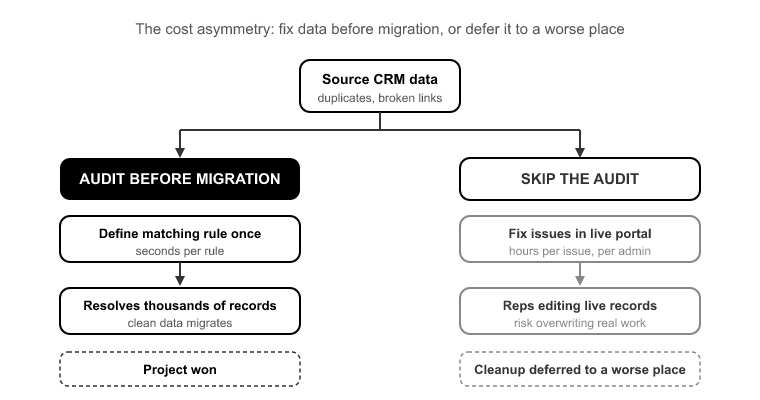
The cost asymmetry is the whole argument. Fixing a duplicate or a broken association in the source data during the audit takes seconds per rule. You define a matching rule once and it resolves thousands of records. Fixing that same issue in a live HubSpot portal after go-live, with reps actively editing records, takes an admin hours per issue and risks overwriting real work someone did that morning.
Teams that skip the audit do not save time. They just defer the cleanup to a worse place: a production environment where the data is now load-bearing. Routing depends on it. Reporting depends on it. Workflow enrollment depends on it. Every problem you did not catch upstream is now ten times more expensive to fix, and it is blocking the people who need the CRM to do their jobs.
This is also why migrations get the reputation for dragging on for three to six weeks. That timeline has almost nothing to do with data volume. A 400,000-record migration does not take longer than a 40,000-record one because of the transfer. Modern migration engines move records fast. It drags because field mapping was done by hand, associations broke mid-run and had to be re-traced, and post-migration cleanup turned into its own multi-week project. The audit front-loads all three of those discoveries. Find them on Day 1, not Day 30.
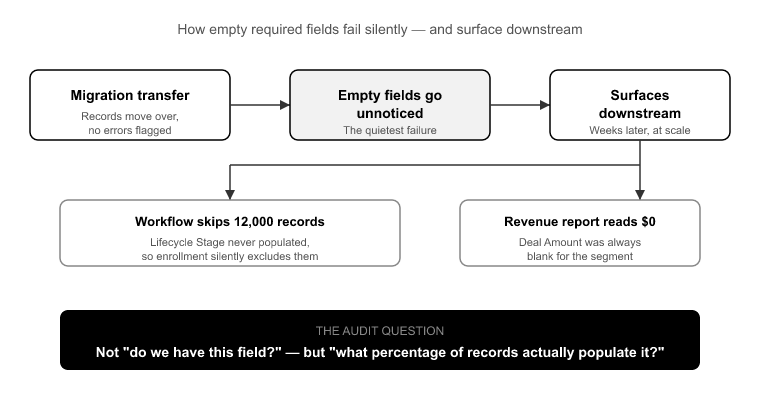
Start with required-field population, because empty fields are the quietest failure in a migration. Nobody notices them during the transfer. They surface downstream, when a workflow that enrolls contacts based on Lifecycle Stage silently skips 12,000 records because that field was never populated in the source, or when a revenue report reads zero for a segment because the Amount field on those deals was always blank.
The audit question is not "do we have this field?" It is "what percentage of records actually have a value in it?" A required field in HubSpot that is empty on 30% of your incoming records is a broken workflow waiting to happen. You have three choices, and you need to make them before mapping: backfill the value in the source, drop the field from the required set in HubSpot, or accept the gap and document it. What you cannot do is discover it after go-live.
Measure population rates on every field you plan to migrate, especially anything that will drive segmentation, routing, or reporting. Empty is not neutral. Empty is a decision you are making by default if you do not measure it.
Ask a team what their duplicate rate is and you will get a guess. The guess is almost always low. In practice, SMB CRMs that have never run a dedup process routinely show 15 to 30% duplicate contact rates [2]. Enterprise orgs with multiple lead sources feeding in and no matching rules can run higher. You do not guess this number. You measure it.
And you cannot measure it properly from a flat CSV export, because duplicates are not always obvious string matches. The same person shows up as jsmith@acme.com and john.smith@acme.com, or as "John Smith" at "Acme" and "John Smith" at "Acme Inc." Real dedup needs matching logic across email, name, and company, not a spreadsheet sort.
Dedup belongs in the source, before migration, always. Here is why. If you carry unmanaged duplicates into HubSpot, they do not just sit there. They get wired into your new association model. Both copies of John pick up different company associations, different deal associations, and different activity histories. Now merging them means reconciling two divergent relationship graphs instead of two contact records. You have made the problem structurally harder by moving it.
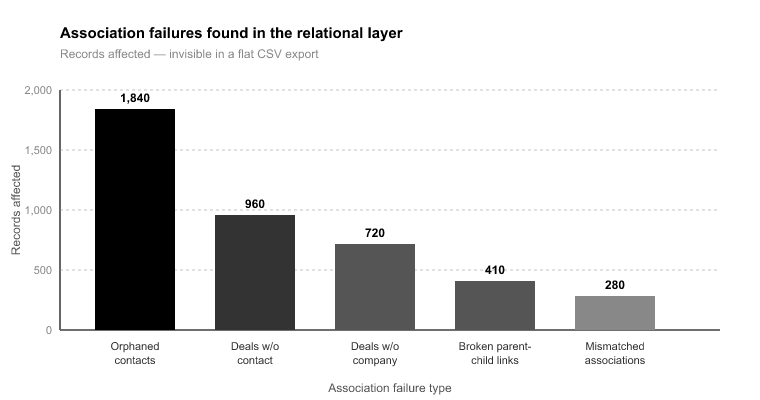
This is the category that catches even experienced teams, because association problems are invisible in a spreadsheet. A CSV export flattens relationships. It gives you a contacts file and a deals file, but the connective tissue between them lives in the relational structure, not the flat rows. You cannot audit associations from a flattened export. You have to read the source database's relational layer directly.
What you are hunting for: orphaned contacts with no company association, deals with no associated contact, activities logged against records that were later deleted, and companies with no contacts attached. Each of these transfers "successfully" and lands broken.
Here is a concrete example. Picture a 120,000-record Salesforce org where 8,000 deals had no associated contact. Migrated as-is, those 8,000 deals arrive in HubSpot as unattributed pipeline: no contact, no email history, no way for a rep to work them. Caught in the audit, you define one association rule, and every one of those deals comes through connected. This is exactly what association integrity mapping is for. It preserves the 1:1 relationships between objects, so a deal that was tied to a contact in the source stays tied to that contact in HubSpot.
Source CRMs also store relationships in ways HubSpot does not. Salesforce's object model does not map cleanly to Contacts, Companies, Deals, and Tickets. If you do not identify those structural mismatches during the audit, you find out weeks later when the history is missing.
A typical mature Salesforce org carries 200 to 400 custom fields [3]. Field utilization follows the 80/20 pattern hard: roughly 20 to 30% of those custom properties hold more than 90% of the data that is actually used [3]. The rest are abandoned experiments, one-off campaign fields, duplicates of standard fields, and columns someone added for a project that ended in 2021.
Migrating all 400 does not preserve information. It clutters HubSpot with dead properties, forces you to build and maintain a mapping layer for fields nobody uses, and buries your reps under property groups full of empty boxes. More is not safer. More is slower to build, harder to validate, and worse to use.
The audit measures utilization per field, meaning what percentage of records have a value, and gives you a defensible cut line. Fields populated on more than 10% of records generally earn their place. Fields under that threshold need a specific reason to migrate, not just inertia. Get the typical org from 400 fields down to the 60 that carry the real data, and both your mapping work and your end-user experience get dramatically cleaner.
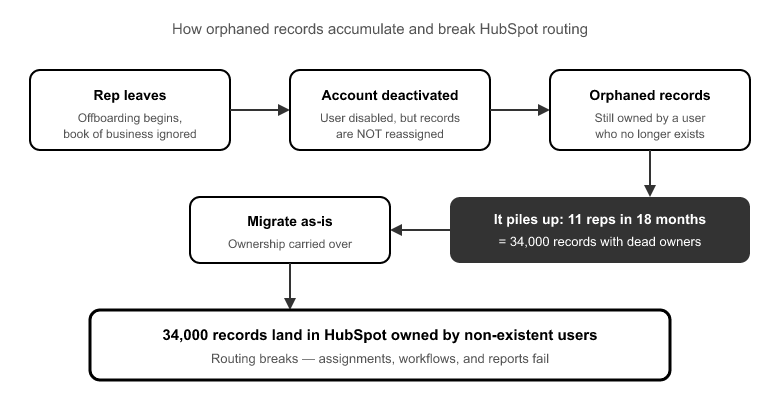
Reps leave. Their Salesforce or Pipedrive accounts get deactivated. But their records still carry them as owner, because deactivating a user does not reassign their book of business. Nobody does that cleanup at offboarding. So it piles up.
Here is the scenario: a 40-person sales team where 11 reps turned over in 18 months, leaving 34,000 records owned by deactivated users. Migrate that as-is and 34,000 records land in HubSpot owned by users who do not exist in the new portal. Routing breaks. Reporting attributes pipeline to ghosts. Workflows that enroll based on owner skip those records entirely. Broken on day one.
The audit finds every record owned by a deactivated user and lets you define transfer logic once: reassign to the territory owner, the manager, or a holding queue. The SuprSwitch ownership transfer engine handles this reassignment before the migration runs, so records arrive owned by real, active users. The alternative is a week of manual reassignment after go-live while routing quietly fails around you.
Everything above sounds like a separate, weeks-long cleanup project. It is not, at least not when the audit is built into the migration itself. In a SuprSwitch migration, the audit is Phase 1, Schema Analysis, and it happens on Day 1.
Phase 1 (Day 1), Schema Analysis : SuprSwitch scans the source CRM database and surfaces your custom field inventory, record counts, property types, and data quality issues: duplicate rate, broken associations, empty required fields, orphaned records, all before a single record moves. Because it reads the relational structure directly rather than a flat export, it catches the association problems a spreadsheet cannot show you. And its no-storage architecture means the source data being scanned is never held on SuprSwitch servers, which is worth knowing for anyone signing off on the security review.
Phase 2 (Day 2), Mapping Logic :The findings from Day 1 feed straight into the transformation layer. This is where your 400 fields get mapped down to the 60 that matter, custom properties get created in HubSpot, association integrity mapping turns those orphaned-deal findings into concrete rules, and the ownership transfer engine gets its reassignment logic for the deactivated-user records. Every decision is made and reviewed before live data moves.
Phase 2 to 3 (Day 2 to 3), Pilot Validation : A representative sample migrates into HubSpot on real records, so you can validate relational integrity, activity history formatting, field-level truncation, and association chains. Anything wrong gets fixed in the mapping layer, not in a live portal after go-live.
Phase 3 to 4 (Day 3 to 4), Final Execution : The full dataset runs through the migration engine with real-time record validation. If a record does not appear in HubSpot within the expected window, it flags immediately instead of surfacing three weeks later in a support ticket. Failed records hit the retry mechanism automatically, so there is no restarting the entire job. Every record is validated post-migration before go-live is confirmed.
That is how a migration that "takes three to six weeks" compresses to 3 to 4 days. The time was never in the transfer. It was in the discovery and the cleanup. Move both to Day 1 and Day 2, before any live data moves, and the execution runs against known, mapped, validated data.
A migration does not fail during the transfer. It fails because someone moved dirty source data faithfully into a clean system and called it done. The duplicate rate, the orphaned deals, the ghost owners, the empty required fields: none of that gets better by moving it. It gets worse, because now it is tangled into a new association model and it is blocking live users.
The crm data audit before migration is where you make those problems cheap to fix. Every issue you catch in the source costs seconds per rule. Every issue you catch after go-live costs an admin hours and risks real work. That is the entire economic case for front-loading the audit, and it is why the audit is the highest-leverage day in the whole project.
Do not start with a spreadsheet. Start with a Schema Analysis that reads your relational structure directly, surfaces the problems a flat export cannot show, and feeds straight into mapping, pilot validation, and execution. That is not a separate cleanup project bolted onto the front. It is Day 1 of a migration that finishes in 3 to 4 days with every record validated before go-live.
A CRM data audit should happen before migration, not as a separate post-migration cleanup project. With SuprSwitch by SuprDense, Schema Analysis is completed on Day 1, covering record counts, duplicate rates, field usage, broken associations, and ownership gaps.
Clean and validate your CRM data before migration. Identifying duplicates, incomplete fields, broken associations, and ownership gaps in the source makes them easier to resolve before they become issues in the new CRM.
Review duplicate records, field completeness and usage, object associations, ownership gaps, record quality, and fields that actually need to be migrated. SuprSwitch by SuprDense surfaces these data-quality issues during Schema Analysis before migration begins.
Use matching rules across key identifiers such as email, name, and company rather than relying only on spreadsheet comparisons. SuprSwitch by SuprDense analyzes the source data to identify duplicate records before they are transferred into the new CRM.
No. Audit field usage first and migrate the fields that contain meaningful, relevant data. SuprSwitch helps identify field utilization so unnecessary or unused properties can be excluded from the migration.
Skipping the pre-migration audit is the #1 cause of post-migration data debt duplicates, broken associations, and ownership gaps. SuprSwitch flags every issue on Day 1, before any record moves.

Discover ideas, strategies, and expertise to help you streamline operations, improve customer experiences, and accelerate growth.