
.webp?width=130&height=24&name=SuprConfig%20(2).webp)





 Book a migration call






Best Salesforce Migration Tools for Your CRM Data & Migration
-
Ujjwal

- Date: August 24, 2026
- 29 min read
The records that break an activecampaign to hubspot migration aren't the ones you worry about. Contacts move. Deals move. Companies move. What breaks are the things ActiveCampaign relies on as its operational backbone, but HubSpot has no native equivalent for: tags, automation logic, subscription status, and email engagement history. Get those wrong and you won't find out during the migration. You find out two weeks later, when a segment is empty, a follow-up never fires, or your first send hits 4,000 people who opted out.
I've run this migration enough times to know the failure pattern cold. The team treats it like a data copy, moves the contacts, flips to HubSpot, and learns the hard way that ActiveCampaign and HubSpot don't share a data model. This guide walks through what actually breaks, how to map it before any record moves, and where the honest scope line sits. One part of this migration isn't a data problem at all.
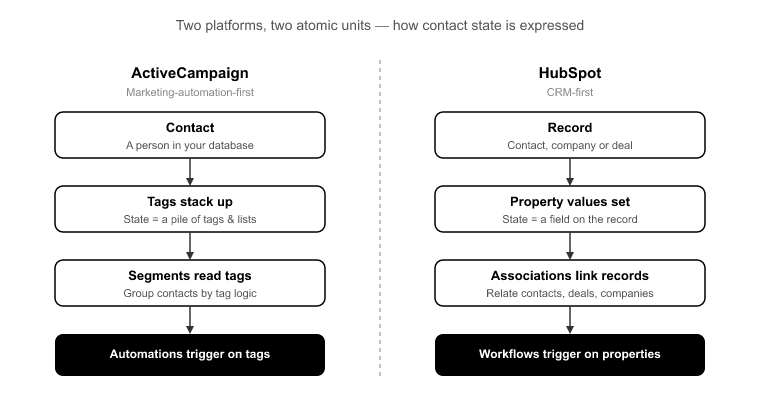
ActiveCampaign is a marketing-automation-first platform. Its core logic runs on tags, lists, and visual automations. A contact's state, where they sit in your funnel, what they've done, what campaign they belong to, is expressed as a stack of tags. Segments read those tags. Automations trigger on them. The tag is the atomic unit of everything.
HubSpot is a CRM-first platform. Its core logic runs on properties, associations, and workflows. State is expressed as a property value on a record, and relationships between records, contact to company, contact to deal, are first-class objects. HubSpot has no tag object at all.
That structural gap is why this is a translation, not a transfer. You can't copy a tag into HubSpot because there's nowhere for it to land natively. You have to decide, tag by tag, what that tag means. Is it a lifecycle state, a behavioral flag, or a campaign membership? Then you translate it into the HubSpot construct that carries that meaning. Skip that decision and the tag either vanishes or clutters your property model with hundreds of near-useless boolean fields.
The teams that struggle here assume a "contact is a contact." The teams that succeed treat the migration as the moment to re-model their segmentation logic in HubSpot's terms. That modeling work is the whole game.
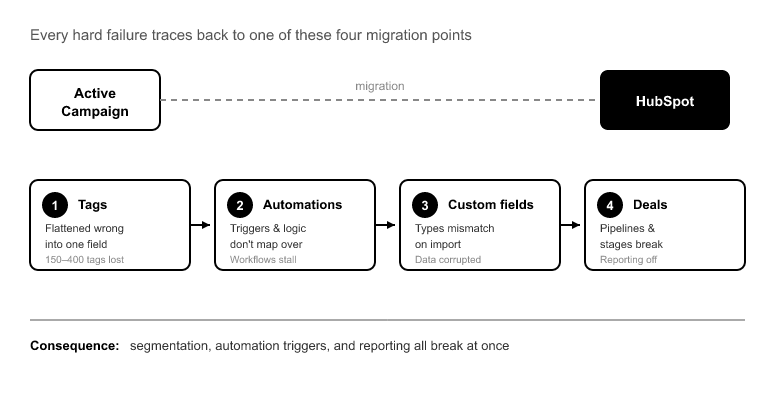
Every hard failure I've seen in an activecampaign to hubspot migration traces back to one of four things. Here's each one, and the specific consequence of getting it wrong.
A mid-market AC org with 60,000 contacts commonly carries 150 to 400 distinct tags,[1] and individual contacts routinely hold 20 to 100 tags each. These tags are the backbone of every segment and automation trigger in the account.
The naive approach creates one boolean property per tag. Now you have 300 checkbox fields cluttering every contact record and every property dropdown, most of them dead weight. The right approach sorts the tags by function: behavioral and state tags become a multi-select property or drive list membership; lifecycle tags map to lifecycle stage or lead status; campaign tags become active or static list memberships. That decision has to be made in the mapping phase, not improvised at import time.
This is the single biggest false assumption in AC migrations. ActiveCampaign's visual automations, tag-triggered entries, wait steps, if/else branches, goal actions, have no data-export path into HubSpot workflows. There is no file, no API endpoint, no tool that carries automation logic across.
The recognizable failure mode: a team migrates contacts and deals cleanly, flips to HubSpot, and finds no automated follow-up fires because nobody rebuilt the 40 AC automations as workflows. The data was perfect. The logic never existed in HubSpot. I'll say this plainly, because glossing over it is how projects blow up: the automation rebuild is a separate track, and no migration tool does it for you. Plan for it as its own workstream, running in parallel to the data migration.
ActiveCampaign tracks unsubscribes per list and globally. HubSpot uses subscription types and a marketing / non-marketing contact status. These don't line up automatically. If opt-out status doesn't map correctly, your first HubSpot send emails people who unsubscribed. That's a CAN-SPAM and GDPR exposure, plus an immediate deliverability hit as spam complaints spike.[2]
This is not a field you reconcile after go-live. Subscription and opt-out mapping is a Day 2 decision, and you validate it in the pilot before a single marketing email is possible.
AC stores opens, clicks, and site-tracking events tied to its own email engine. HubSpot's engagement timeline is tied to HubSpot-sent email. You can't turn a historical AC email open into a native HubSpot email event, because the underlying send never happened in HubSpot.
What you can do is preserve that history as timeline activities and notes on the contact record, so sales keeps the context. That's the honest ceiling: the history is retained and readable, but it won't populate HubSpot's native email engagement metrics. Set that expectation with stakeholders before they go looking for open rates that were never HubSpot's to report.
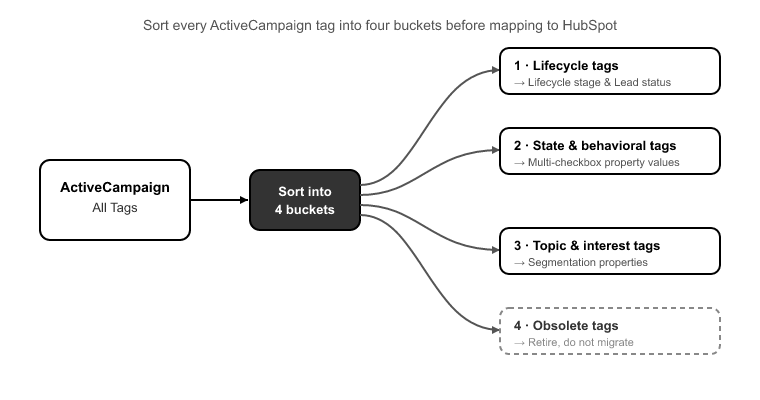
Tag mapping is where the migration is won or lost, so it deserves its own method. Before you touch HubSpot, sort every tag into one of four buckets:
Lifecycle tags: anything that expresses funnel position, like "MQL," "Customer," or "Churned." These map to HubSpot's lifecycle stage and lead status properties. There should be a clean handful of these, not dozens.
State and behavioral tags: flags like "Attended Webinar," "High Intent," or "Requested Demo." These become values in a single multi-select property, one property with many options, rather than one boolean each. That keeps your property model clean while preserving the filter logic.
Campaign and source tags: "Q3 Newsletter," "Trade Show 2024." These map to list membership: static lists for historical membership, active lists where the criteria still apply.
Dead tags: every AC account has them, typos, one-off tests, tags applied to three contacts back in 2021. The migration is the moment to leave them behind. Don't carry noise into a clean instance.
Do this sorting exercise against the actual tag inventory, not from memory. That's why the first thing SuprSwitch does in Phase 1, Schema Analysis is surface the complete tag list with usage counts, so you're mapping against reality and can spot the dead tags at a glance.
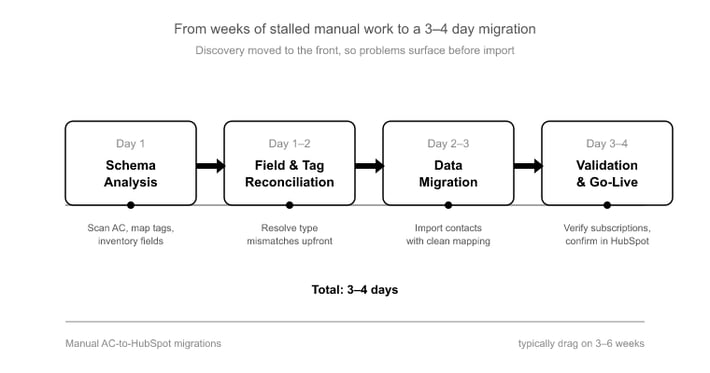
Manual AC-to-HubSpot migrations commonly drag on for three to six weeks,[3] and almost never because of data volume. They stall because tag-mapping decisions, subscription reconciliation, and field-type mismatches get discovered late, mid-import, when they're expensive to fix. SuprSwitch compresses the data migration to 3 to 4 days by moving all that discovery to the front.
Phase 1, Schema Analysis (Day 1) : SuprSwitch scans the ActiveCampaign instance and surfaces the full tag inventory, custom field list, list memberships, deal and pipeline structure, record counts, and data-quality issues like empty required fields, duplicate risk, and field-type mismatches. Nothing moves yet. This is where the tag explosion and the dropdown-imported-as-text problems get exposed, before they can corrupt anything.
Phase 2, Mapping Logic (Day 2) : The transformation layer defines exactly how each AC tag becomes a HubSpot multi-select property or list membership, maps custom fields to correctly typed HubSpot properties, maps AC accounts to Companies, and maps deals into the target pipeline with preserved create dates and stage-entry timestamps, so time-in-stage and velocity reporting survives. This is also where the ownership transfer engine sets logic for any deactivated AC users, so records don't land unassigned. And association integrity mapping preserves the contact-to-deal-to-company chain so deals don't arrive orphaned from their contacts.
Phase 3, Pilot Validation (Day 2 to 3) : A representative sample runs into HubSpot to confirm tags render correctly as properties and list memberships, engagement history formats as intended on the timeline, subscription status carries over accurately, and no field truncation occurs. Anything wrong gets fixed in the mapping layer, not cleaned up after the full run. The pilot migration is the difference between finding a truncation bug in 200 records versus 60,000.
Phase 4, Final Execution (Day 3 to 4) : The full dataset runs through the migration engine with real-time record validation. If a contact doesn't appear in HubSpot within the expected window, it flags immediately rather than surfacing three weeks later in a support ticket. The retry mechanism re-attempts failed records automatically without restarting the whole job. Every record is validated post-migration before go-live is confirmed.
One more thing that matters for GDPR-sensitive contact databases: SuprSwitch runs on a no-storage architecture. Your AC contact and engagement data is never held on SuprSwitch servers. It's transformed in transit and written straight to your HubSpot portal.
Here's the cost lever most teams miss. Every AC contact imported as a HubSpot marketing contact is billable. Migrate all 60,000 contacts as marketing by default and you've inflated your HubSpot bill for the life of the account.[4]
The migration is the moment to decide which contacts are marketing versus non-marketing. Contacts you'll actively email are marketing. Historical, unsubscribed, or closed-lost contacts you want for record-keeping but won't send to can land as non-marketing at no per-contact cost. This gets set in the Phase 2 mapping logic, usually driven off the same subscription-status and lifecycle data you're already reconciling. Decide it deliberately, once, and you protect the budget permanently.
An activecampaign to hubspot migration is a structural translation between two platforms that model data in fundamentally different ways. The contacts and deals are the easy part. The tags, subscription status, engagement history, and the marketing-contact decision are where migrations actually break, and every one of them is a mapping decision that has to be made before data moves, not improvised at import.
Split the work into two honest tracks. The data track, contacts, companies, deals, custom fields, tags, and engagement history, runs cleanly in 3 to 4 days with SuprSwitch, because Schema Analysis and Mapping Logic front-load the discovery and Pilot Validation catches problems before the full run. The automation track, rebuilding your AC automations as HubSpot workflows, is manual, parallel, and owned by you. Anyone telling you a tool does both is setting you up for dead workflows on go-live day.
Run those tracks together, make your tag and subscription mapping decisions on Day 1 and 2, and you go live with clean data, intact segmentation, protected compliance status, and a HubSpot bill you actually chose. That's the difference between a migration you recover from and one you barely notice.
ActiveCampaign automation logic is recreated in HubSpot workflows, with triggers, actions, and enrollment criteria mapped to HubSpot’s workflow structure. SuprSwitch by SuprDense handles the underlying data migration, while the automation workstream prepares workflows for a smooth transition.
With SuprSwitch by SuprDense, the data migration typically takes 3–4 days, including schema analysis, data mapping, pilot validation, and final execution. Automation setup runs alongside the migration and varies based on workflow volume and complexity.
SuprSwitch by SuprDense maps ActiveCampaign tags to the appropriate HubSpot properties or lists, transfers contacts and related records, and preserves historical email engagement as timeline activities. Unsubscribe and subscription data is mapped to HubSpot’s subscription settings to maintain communication preferences.
Map automations, segments, deal data, and engagement history accurately validated record-by-record in 3–4 days.

Discover ideas, strategies, and expertise to help you streamline operations, improve customer experiences, and accelerate growth.