
 Book a migration call

The main migration finishes on schedule. Every contact, company, and deal from the old CRM is in the new one, and the counts reconcile. But the sales team never stopped working. Since the data was extracted, reps have logged calls, created new leads, moved deals forward, and updated phone numbers, all in the old system. If the business switches over now, the new CRM starts out of date, and the first thing reps notice is that yesterday’s work is missing.
That gap is what delta CRM migration closes. This guide explains the difference between a full migration and a delta, or incremental, migration, how each works, when each is needed, and how new and updated records are handled between the two. It also explains how SuprSwitch, SuprDense’s CRM migration platform, fits into a full plus delta approach, what SuprDense has documented about it, and how to plan the final cutover around it.
What Is Full CRM Migration?
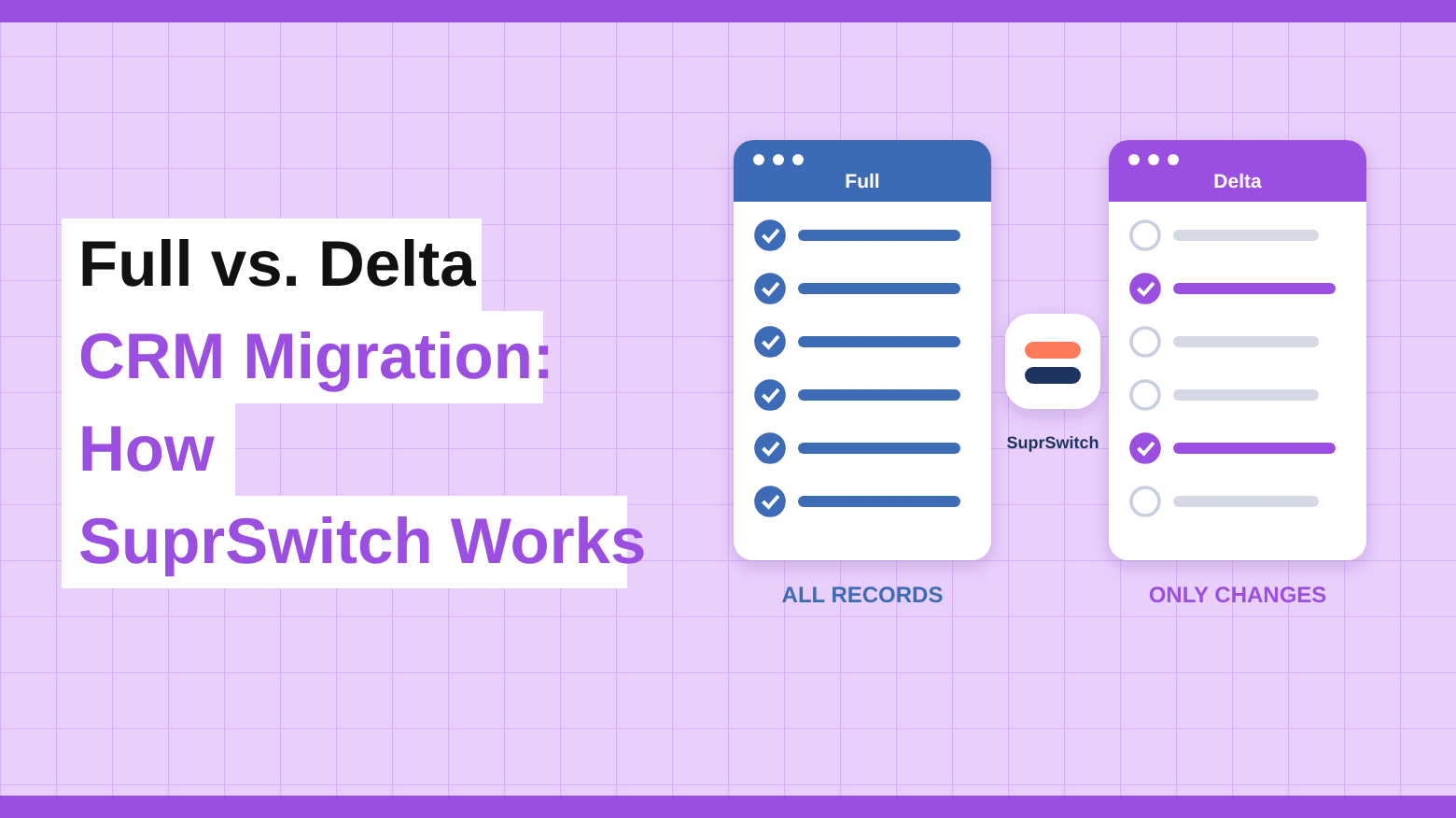
A full CRM migration moves every in-scope record from the source CRM to the destination in one planned run: users, objects, properties, records, activities, and the associations between them. It builds the new CRM’s dataset from scratch, using the mapping agreed for the project.
In SuprSwitch, the full migration is the last step of a set sequence. SuprDense’s help center describes it as: connect the source and destination CRMs, map the data, run a sample migration, then start the full migration, and states that a full migration can only start once a sample migration has been completed. During the full run, SuprDense states that every migrated record is validated in real time against the destination, and that a retry mechanism handles failures without halting the migration.
A full migration is a snapshot. It reflects the source as it was when the data was read. Anything created or changed in the source after that moment is not in it, which is why most busy CRMs need something more before cutover.
What Is Delta or Incremental CRM Migration?
A delta, or incremental, CRM migration moves only what has changed since an earlier run. Instead of moving the whole dataset again, an incremental data transfer picks up records created since the last run, records updated since the last run, activities logged since the last run, and, where the plan covers them, records deleted or merged in the source.
Delta data migration rests on two capabilities. The first is finding what changed. Most CRMs record when each record was created and last modified, so a delta run can select records with timestamps after the previous run. This is a form of what AWS and IBM call change data capture, and both note a limitation of the timestamp-based method: it can miss deletions, because a deleted record no longer has a timestamp to find. Deletes need their own check, such as comparing record IDs between the two systems.
The second is matching each change to the right record in the destination. An updated contact must update the contact created in the full run, not create a second one. That requires a stable identifier stored on each migrated record, usually the source record ID, or a unique value such as email for contacts and domain for companies. Without reliable matching, a delta run creates duplicates faster than anyone can clean them up.
Full Migration vs. Delta Migration: Key Differences
| Factor | Full CRM migration | Delta CRM migration |
|---|---|---|
| What moves | Every in-scope record | Only records created or changed since the last run |
| When it runs | Once, to build the destination | After the full run, and again at cutover |
| Main risk | Data changing in the source while it runs | Missed changes, duplicates, or overwritten edits |
| Depends on | A complete, tested mapping | The same mapping, plus change detection and record matching |
| Validation | Record counts and samples against the source | The same checks, applied to each delta |
| Freeze needed | Long, if no delta follows | Short, covering only the final delta |
The two are not alternatives. The full migration builds the new CRM, and delta runs keep it in step with the source until the business switches over. The question is not which one to use, but whether a full run alone is enough.
When Should Businesses Use Full Migration?
Every migration starts with a full run, and for some businesses one full run is the whole migration. A full CRM migration without later deltas can be enough when the source changes slowly, such as a small team or a CRM used mainly for reference; when the business can freeze the source for the whole migration window; when the dataset is small enough to move and check within that window; or when the old CRM is already out of daily use, for example after teams have moved to another tool.
In those cases, a single run followed by validation and cutover is simpler, with one mapping, one load, and one reconciliation. Adding delta runs where nothing changes adds work without adding accuracy.
When Are Incremental Migration Runs Needed?
Incremental runs are needed whenever the source keeps changing between the start of the full migration and cutover. That covers most active sales and service teams. Typical signs:
- Teams cannot stop working: Sales and support need the old CRM until the new one is live.
- The dataset is large: The bigger the volume, the longer the full run and validation take, and the more changes pile up in the meantime.
- Activities are logged constantly: Calls, emails, and meetings are created every day and must land on the right records.
- Validation and training take time: Testing reports, rebuilding automation, and training users all happen after the full run, while the source keeps moving.
- The freeze must be short: If the business can only tolerate a brief read-only window, most changes have to move before it starts.
In these situations, an incremental CRM migration carries the changes across, and the final freeze only has to cover the last small set.
How SuprSwitch Supports Delta Migration
The SuprSwitch CRM migration solution is built around a full migration that is mapped, sampled, validated record by record, and retried where it fails. SuprSwitch delta migration extends that same process to the changes made after the main run, so the destination is current at cutover.
SuprDense’s consolidation case study shows it in a real project. A prop-tech business consolidating its Salesforce environment and an acquired company’s HubSpot portal into a new HubSpot instance moved the Salesforce data, and then, according to the case study, “a delta run then captured activities created after the initial Salesforce extraction so the destination did not become stale before cut-over.” The production cutover took 18 hours 47 minutes, and the wider freeze stayed within the agreed one-week limit.
The case study also describes the identity controls Switch applied across that migration, which are exactly what a delta run relies on. Switch treated the reference ID as the governing identity, so changes matched the right records. Values already present in the new portal stayed authoritative, while legacy data filled only blank fields. Records with a primary-key clash and a conflicting value were held for review rather than forced in. And required company lookups acted as a guardrail: when a relationship could not be established safely, the record did not move.
What SuprSwitch does not decide is the shape of your delta plan. How many delta runs the project needs, which objects and activities each one covers, whether deletions in the source are carried across, and when the final run happens are agreed with SuprDense while the migration is scoped. Settling them early means the delta runs and the cutover are planned together, rather than improvised in the final week. For the full sequence of phases around these runs, see the SuprSwitch migration workflow.
Mapping and Validating Data During Migration
Delta runs are only as reliable as the mapping and validation behind them, so both are settled before the full run and reused for every run after it.
In SuprSwitch, default objects and properties are mapped automatically, custom objects and properties are mapped or created, and SuprDense states that a mapping cannot be saved until every property and object is mapped, and a migration cannot start until the mapping is saved. If the mapping changes after the sample, SuprDense states that another sample migration is needed before the full migration. That discipline matters even more with deltas: a field mapped one way in the full run and another way in a delta run produces records that disagree with each other.
Validation follows the same logic. SuprDense’s Pilot Validation phase checks relational integrity, activity formatting, field truncation, and association chains on a sample, and the full run validates each record in real time against the destination. Each delta run deserves the same scrutiny: compare the counts of new and updated records with what the source reports for the same period, spot-check records that were updated, and confirm that new activities sit on the right contacts, companies, and deals.
Keep one more check in mind if HubSpot is the destination. HubSpot deduplicates contacts by email and companies by domain on import, but it notes that companies created through the API are not deduplicated by domain. A tool-based delta run therefore relies on its own matching logic, which is why stored identifiers and matching rules matter so much.
Handling New and Updated CRM Records
New, updated, and deleted records behave differently, and a delta plan should treat each one explicitly.
| Change in the source | What the delta run must do | What to check |
|---|---|---|
| New record | Create it in the destination, with owner and associations | It does not duplicate a record from the full run |
| Updated record | Update the existing destination record, matched by its identifier | The right fields changed, and none were overwritten that should not be |
| New activity | Create it and attach it to the correct records | It appears on the contact, company, and deal timelines it belongs to |
| Changed association | Update the link, such as a contact moving to another company | Old and new links are as the source shows them |
| Deleted or merged record | Archive, delete, or flag it, as the plan states | Timestamp queries alone will not find it |
Two situations need a rule before the first delta. The first is order: a new activity may belong to a contact that was also created after the full run, so parent records have to move before the records that refer to them. The second is conflict: once people start testing or working in the new CRM, the same record may change in both systems. Decide which side wins for each object, for example that the source stays authoritative until cutover, and communicate it, so nobody’s edits are silently overwritten.
A delta run is also not the same as CRM data synchronization. A sync keeps two live systems aligned indefinitely, in one or both directions. A delta run is a controlled catch-up step in one direction, and it ends when the old CRM is retired.
How to Plan Your Final CRM Cutover
The final cutover is where the full and delta runs come together. A clean cutover usually follows this order:
- Complete the full run and validate it: Reconcile counts, check samples, and fix mapping issues.
- Run deltas as needed: Keep the destination current while reports are rebuilt and users are trained.
- Pause automation in the destination during loads: Stop workflows from sending emails, creating tasks, or reassigning owners as delta records arrive.
- Freeze the source: Make it read-only, or allow only logged urgent changes.
- Run the final delta: Capture the last records and activities created or changed before the freeze.
- Validate and decide: Reconcile the final counts and make the go or no-go call.
- Switch over: Point integrations at the new CRM, turn automation back on, and open it to users.
Because the delta runs carry most of the changes before the freeze, the freeze itself can stay short. Keep the old CRM available read-only for an agreed period afterwards, so anyone who spots a gap can check the original.
Full and Delta Migration Readiness Checklist
| Area | Ready when |
|---|---|
| Mapping | Saved, complete, and unchanged since the last sample migration |
| Identifiers | Every migrated record carries a stable source ID or unique matching value |
| Delta scope | Objects, activities, and deletions covered by each delta run agreed with SuprDense |
| Order | Parent records move before the records that refer to them |
| Conflicts | A rule for records changed in both systems agreed and communicated |
| Validation | Counts and spot checks defined for the full run and for each delta |
| Automation | Destination workflows paused during loads, with a plan to turn them back on |
| Freeze | Freeze window and final delta timing agreed with the business |
| Cutover | Go or no-go criteria, owners, and rollback steps written down |
Conclusion
A full CRM migration builds the new system from a snapshot of the old one, and delta CRM migration keeps it current while the business keeps working. Used together, they let teams move a busy CRM without a long freeze, as long as every run follows the same mapping, the same identity and matching rules, and the same validation. New records, updated records, activities, changed associations, and deletions each need a clear rule, and the final delta belongs inside a planned cutover.
Delta migration does not remove the need for validation; it adds runs, and each one is checked the same way. Start by agreeing your delta scope and cutover timing while the migration is scoped.
Frequently Asked Questions
01 What is delta CRM migration?
It is a migration run that moves only the records created or changed since an earlier run, rather than the whole dataset. It usually follows a full migration and keeps the destination current until cutover.
02 What is the difference between full and incremental migration?
A full migration moves every in-scope record once, as a snapshot of the source. An incremental migration moves only what has changed since the last run, which keeps the destination current while teams keep working and shortens the final freeze.
03 When should a business use delta migration?
When the source CRM keeps changing between the full run and cutover: teams cannot stop working, the dataset is large, activities are logged constantly, or the freeze must be short. If the source barely changes or can be frozen throughout, a single full run may be enough.
04 Can incremental migration transfer newly updated CRM records?
Yes. A delta run finds records changed since the last run, usually by their last modified date, and updates the matching record in the destination using a stored identifier. Deletions need a separate check, because a timestamp query cannot find a record that no longer exists.
05 How does SuprSwitch support delta migration?
Yes, a delta run followed the main Salesforce migration and captured activities created after the initial extraction, so the new portal was current at cutover, with the same identity rules and record validation applied across the project. The scope of each delta run is agreed with SuprDense during planning.
See SuprSwitch In Action
Try a sample migration with SuprSwitch, or book a migration call with SuprDense to plan your full and delta runs.