
 Book a migration call

When teams evaluate a migration tool, the first question is rarely about speed. It is about coverage. Will the custom objects come across? Will five years of calls and emails still sit on the right contact? Will deals keep their owners, their stages, and their links to companies? A tool that moves contacts and companies but leaves activities, associations, or ownership behind turns a migration into a rebuild.
This guide is for RevOps leaders, CRM admins, and agencies who want a clear, specific answer to that question for SuprSwitch. It explains how SuprSwitch works, which platforms it supports, and exactly what it covers: standard and custom objects, properties, activities, files, users and ownership, associations, and pipelines, along with how sample migrations and record validation confirm the result. It is a product specification, not a general migration guide, so every capability described here comes from SuprDense’s published product pages and help center.
What Is SuprSwitch and How Does It Work?
SuprSwitch is SuprDense’s CRM migration tool, built to move data between CRMs while keeping records, relationships, and history connected. SuprDense describes it as a way to switch platforms “while keeping your business processes intact.”
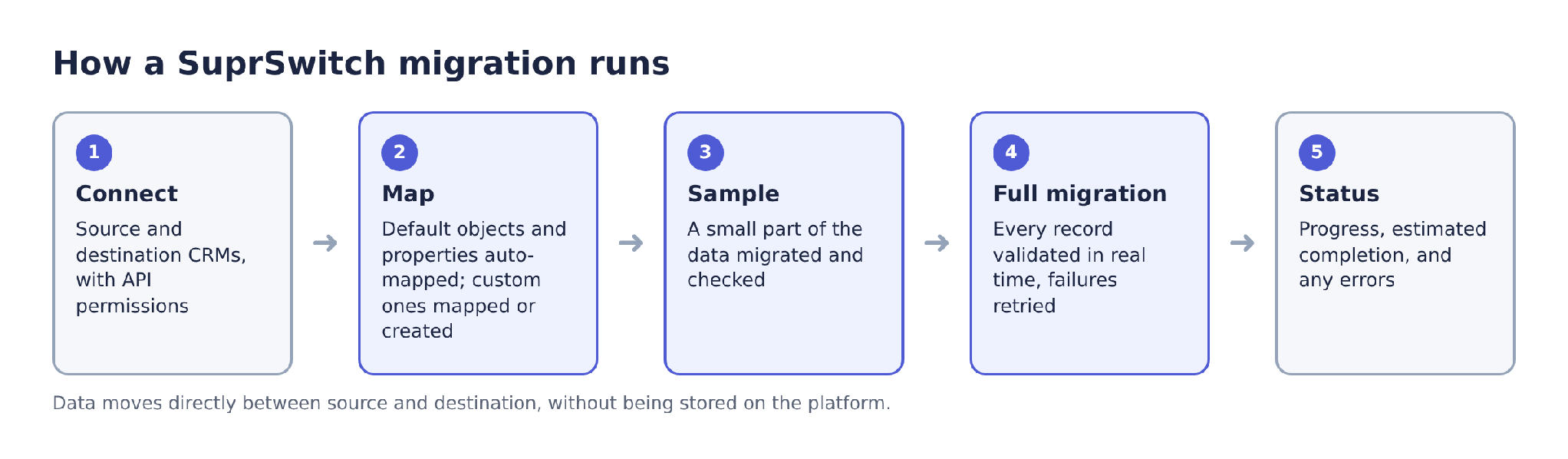
In the SuprSwitch, a migration follows four steps, as described in SuprDense’s help center:
- Choose the source and destination: Connect both CRMs to SuprSwitch, with the API permissions needed to read and write the data.
- Map your data: SuprSwitch automatically maps default objects and properties between the two platforms. You review the mapping, map custom objects and properties, and create anything missing in the destination.
- Run a sample migration: A small part of the database is migrated first, so you can check that associations, activities, and properties arrive correctly.
- Run the full migration: Once the sample is complete, the full migration runs, with a status screen showing progress, estimated completion, and any errors.
According to SuprDense, migration data transfers directly between source and destination, with no storage on the platform, and in its consolidation case study SuprSwitch processed the migration as connected CRM data rather than separate CSV files. To see how a migration plays out for a SaaS company, read about the SuprSwitch SaaS CRM migration process.
Which CRM Platforms Does SuprSwitch Support?
SuprSwitch is built mainly for migrations into HubSpot and Salesforce. SuprDense’s help center lists the platforms currently supported for migration in the app as HubSpot, Pipedrive, Salesforce, Zoho CRM, Zendesk, Freshsales, Monday, Insightly, Copper, Act!, Pipeline, and Groove.
SuprDense’s migrations directory goes further. It lists migration paths into HubSpot from a wide range of source systems, including CRMs such as Microsoft Dynamics 365 Sales, SugarCRM, Close, Keap, and Zoho Bigin, marketing platforms such as Marketo Engage and Pardot, and helpdesk and support tools such as Zendesk Sell and Intercom. It also lists paths into Salesforce, such as HubSpot to Salesforce, Zoho CRM to Salesforce, Microsoft Dynamics to Salesforce, and Zendesk to Salesforce Service Cloud.
Coverage depends on both platforms in a pair. SuprDense’s help center notes that some platforms do not support custom objects, custom properties, or associations, so what can be created or mapped varies by source and destination. Confirm your exact source and destination with SuprDense before planning the scope.
Standard and Custom CRM Objects: What Can Be Migrated?
CRM objects migration in SuprSwitch covers both default and custom objects.
- Standard objects: SuprDense lists contacts, leads, accounts, activities, tasks, notes, and email histories among the data it migrates, and its case study describes companies, contacts, deals, calls, emails, meetings, notes, tasks, and tickets moving into HubSpot.
- Automatic object mapping: Default objects are automatically mapped between the two platforms when you set up the migration.
- Custom object migration: Custom objects can be mapped to existing default or custom objects in the destination, or created from within SuprSwitch with their corresponding properties.
- One-to-one mapping rule: SuprSwitch does not allow two source objects to be mapped to a single destination object, which SuprDense says prevents data inaccuracies.
On the Salesforce to HubSpot path, SuprDense’s migration page gives more detail: leads, including converted and unconverted leads, map to contacts, accounts map to companies with parent company logic, opportunities map to deals, tasks and events map to engagements, and custom Salesforce objects map into HubSpot custom objects. Person accounts are split into a contact and a company that stay linked.
Properties and Custom Field Mapping
CRM data mapping is where most of the work in a migration sits, and SuprSwitch handles it at the property level.
- Default properties: Mapped and populated automatically.
- Custom properties: Map each source custom property to an existing destination property, or create a new custom property from within SuprSwitch.
- Property options: Map properties and their options, so dropdown values carry across.
- Missing defaults: If a default property has no equivalent in the destination, you create a custom property to hold it.
- Data types: Where a data type is not supported in the destination, SuprSwitch either maps it automatically to the most viable option or lets you choose the property you consider most appropriate.
- Complete mapping: A mapping cannot be saved until all properties and objects are mapped, and a migration cannot start until the mapping is saved.
For Salesforce migrations, SuprDense’s Salesforce to HubSpot page adds that field types are detected automatically so HubSpot properties are created with matching data types, picklist and multi-select values are carried into HubSpot dropdown properties, and Salesforce formulas are converted into HubSpot calculated properties or their values are extracted.
Migrating Notes, Emails, Calls, Meetings and Tasks
Activities are often what teams fear losing most, because they hold the history of every relationship. SuprSwitch covers CRM activity migration as part of the migration, not as a separate project.
- Activity types: SuprDense states that notes, calls, meetings, tasks, and other activities are kept intact when you migrate, and lists email histories among the data it moves.
- On the right records: Activities are migrated with their associations, so each one stays on the contact, company, or deal it belongs to.
- Sample check: The sample migration is designed to confirm that activities arrive correctly before the full run.
For Salesforce, SuprDense’s migration page states that tasks, events, and emails move into the HubSpot timeline, with historical activity timelines reconstructed on HubSpot engagement records. It also notes that some historical data types are locked by HubSpot, so plan with SuprDense how those are represented.
Files, Records and Historical Data
Beyond objects and activities, teams usually need the files and history attached to their records.
- Files: SuprDense states that SuprSwitch moves objects, records, files, and every activity. On the Salesforce to HubSpot path, file attachments are moved to HubSpot’s file manager and re-linked to the relevant records.
- Record volume: The duration and cost of a migration depend on the total number of records, which SuprSwitch shows during setup.
- Historical context: SuprDense describes record ownerships, historical data, and actions as staying intact, and its consolidation case study describes activities landing on the correct records with ownership and timestamps intact.
| Data type | Coverage in SuprSwitch | Notes |
|---|---|---|
| Default objects | Migrated, with automatic mapping | Contacts, companies or accounts, deals or opportunities, and more, depending on the platforms |
| Custom objects | Migrated, mapped or created in SuprSwitch | Depends on whether both platforms support custom objects |
| Default properties | Migrated, with automatic mapping | Missing equivalents are created as custom properties |
| Custom properties and options | Migrated, mapped or created in SuprSwitch | Unsupported data types mapped to the closest option |
| Activities | Migrated | Notes, calls, meetings, tasks, and email histories |
| Files | Migrated | Re-linked to records on the Salesforce to HubSpot path |
| Users and ownership | Migrated or created | Users matched by email, or created from SuprSwitch |
| Associations | Migrated automatically | Some platforms need custom properties to form them |
| Pipelines and deal stages | Migrated, mapped, merged, or created | Several pipelines can be merged into one |
| Automations and business logic | Not migrated by the engine | Rebuilt in the destination |
User Migration and Record Ownership Transfer
Ownership decides who sees what, who is credited for what, and how reports roll up, so it needs to be right from day one.
- User mapping: Users that already exist in the destination with the same email address are mapped automatically. Others can be selected manually.
- Creating users: If a user does not exist in the destination, you can create them from SuprSwitch. Created users receive an email invitation to join, and until they do, they appear as inactive or yet to join, depending on the platform.
- Deactivated users: SuprDense lists migrating deactivated or inactive users among the core SuprSwitch features, for historical and forecasting accuracy.
- Ownership transfer: Records and activities keep their owners, or are assigned to new users, so ownership is maintained or transferred as you decide.
CRM Associations and Relationship Preservation
A migration that moves records but breaks their relationships leaves a CRM nobody can use. CRM association migration is one of SuprSwitch’s core functions.
- Automatic associations: SuprDense’s help center states that SuprSwitch automatically maps and migrates associations from the source to the destination CRM.
- Connected records: Companies, contacts, deals, and activities stay linked to each other, without rebuilding relationships through lookups.
- Labeled relationships: SuprDense describes association mapping that preserves one-to-one and labeled relationships between objects.
- Platform limits: Some CRMs do not support associations natively, and in those cases custom properties are needed to form them.
In SuprDense’s consolidation case study, companies and contacts were established before dependent sales and engagement records, and records whose required company relationship could not be established safely were held back rather than loaded incorrectly.
Pipeline and Deal Stage Migration
Deals only make sense in the context of their pipeline and stage. SuprSwitch handles pipelines as part of the mapping.
- Create pipelines: Create new pipelines in the destination CRM to receive your deal data.
- Map stages: Map each source stage to a destination stage, or create a new stage.
- Merge pipelines: Merge several source pipelines into one, along with their deal stages.
On the Salesforce to HubSpot path, SuprDense states that pipeline stages and close dates map directly to customized deal pipeline stages.
Sample Migration and Real-Time Record Validation
Coverage is only useful if you can confirm it. SuprSwitch builds two checks into every migration.
- Sample migration: A sample migrates a small part of the database so you can check for errors in mapping, API permissions, and data types, and confirm that associations, activities, and properties arrive without loss. A full migration can only start after a sample is complete, and if you change the mapping, you run another sample first.
- Real-time record validation: SuprDense states that SuprSwitch validates every migrated record in real time to check that it has reflected in the destination CRM.
- Retries: A built-in retry mechanism handles failures and prevents halts in the migration.
- Status and errors: The status screen shows how much data has been migrated, the estimated completion, and any errors.
| Coverage area | Spreadsheet export and import | SuprSwitch |
|---|---|---|
| Objects | One file per object, imported separately | Default and custom objects mapped and migrated together |
| Properties | Columns matched by hand | Default properties mapped automatically, custom properties mapped or created |
| Activities | Often left behind or imported separately | Notes, calls, meetings, tasks, and email histories migrated |
| Associations | Rebuilt with lookups after import | Migrated automatically |
| Owners | Reassigned by hand | Users mapped by email or created, ownership kept or transferred |
| Pipelines | Stages recreated manually | Pipelines created, stages mapped, pipelines merged |
| Confirming the result | Spot checks after import | Sample migration, then real-time record validation |
Want to see what SuprSwitch covers for your own CRM? Try a sample migration, or book a migration call with SuprDense to review your objects, activities, and pipelines.
Conclusion
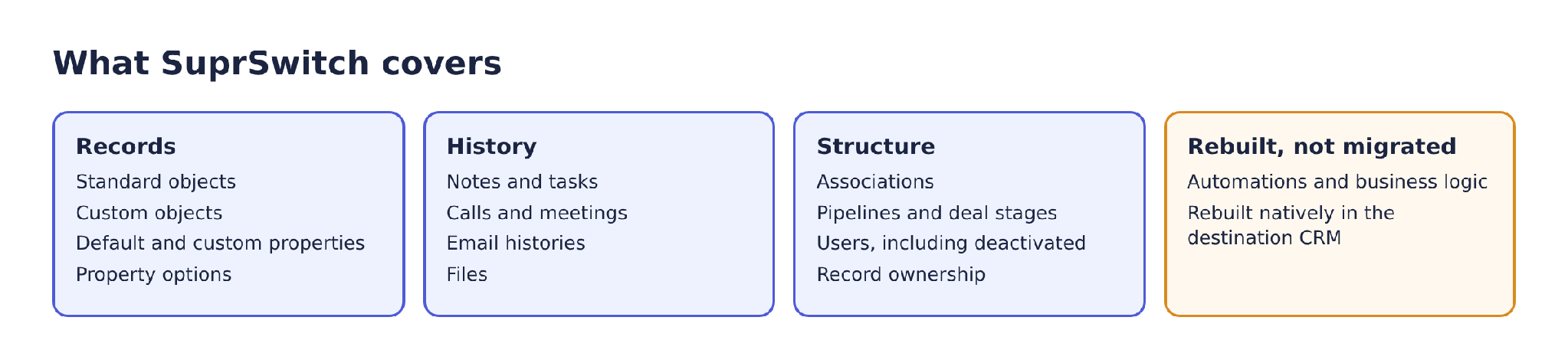
SuprSwitch’s CRM data migration capabilities cover the parts of a CRM that make it useful: standard and custom objects, default and custom properties with their options, notes, calls, meetings, tasks, and email histories, files, users and ownership, associations, and pipelines with their deal stages. Default objects and properties are mapped automatically, missing objects and properties can be created from within SuprSwitch where the platform allows it, and every migration starts with a sample before the full run, followed by real-time validation of each record.
Coverage still depends on the platforms involved, and automations are rebuilt rather than migrated, so confirm your exact source, destination, and objects at the start. The fastest way to see what SuprSwitch covers for your own data is to run it: try a sample migration with SuprSwitch, or book a migration call with SuprDense.
Frequently Asked Questions
01 What types of data can a CRM data migration tool migrate?
A CRM data migration tool can transfer contacts, companies, leads, deals, accounts, custom objects, properties, notes, emails, calls, meetings, tasks, files, user information, record ownership, associations, and sales pipelines. The exact data coverage depends on the source and destination CRM platforms.
02 Can CRM migration tools migrate custom objects and custom fields?
Yes, CRM migration tools like SuprSwitch support custom object and custom field migration. Custom objects and properties can be mapped to existing destination fields or created within the destination CRM, depending on platform compatibility.
03 How are CRM activities and historical records migrated with SuprSwitch?
CRM activities such as emails, calls, meetings, notes, and tasks can be migrated along with their associated contacts, companies, and deals. This helps preserve historical interactions and maintain context across customer records.
04 Does CRM data migration preserve record associations and ownership?
Yes, SuprSwitch automatically maps and migrates CRM associations between related records. User ownership can also be preserved or transferred, with existing users matched by email address or new users created in the destination CRM.
05 How can I validate data after CRM migration?
You can validate migrated CRM data through a sample migration before executing the full transfer. SuprSwitch also provides real-time record validation, migration progress tracking, and error reporting to help identify and address migration issues.
Manual migrations cost more than engineer hours.
Skip the QA cycles, data cleanup, and errors found weeks after go-live. SuprSwitch runs the full migration in 3-4 days, validated record by record.