
.webp?width=130&height=24&name=SuprConfig%20(2).webp)





 Book a migration call






From 60 Days to 6 Days: How Agencies Are Cutting HubSpot Onboarding Time
-
Himanshi

- Date: September 29, 2026
- 9 min read
.svg)
Here's the pattern I see in almost every agency stuck below their revenue ceiling: they treat every HubSpot onboarding as a one-off build. A new client signs, and a senior admin sits down to rebuild the same property groups, the same base pipelines, the same lead-rotation workflows, the same permission sets. From memory. The same ones they built for the last client three weeks ago. They call it craftsmanship. Really, it's unbilled labor with a consistency problem.
Here's the uncomfortable truth: roughly 70% of a standard B2B Sales Hub configuration is identical across clients.[1] The structural layer barely changes. That means property groups, base properties, pipeline scaffolding, standard automation, and permission architecture. What changes is the client's actual sales process logic, their data model exceptions, and their reporting needs. That's the 30% that deserves human judgment. Repeatable HubSpot onboarding means you templatize the 70% and save your skilled hours for the 30%, with validation gates between milestones so you never build stage two on a broken stage one.
Walk through what a standard Sales Hub build actually contains. You've got 30 to 50 custom properties spread across 4 to 6 property groups. Two or three pipelines, each with 5 to 8 deal stages. Eight to twelve workflows covering lead rotation, deal-stage automation, and internal notifications. And a permission model that separates reps from managers from admins.
An experienced admin builds all of that by hand in about two days.[2] Now do it across 20 clients a year. That's 40 or more admin-days spent on structural work that is fundamentally the same every time. You're paying senior-rate labor to retype the same lifecycle-stage property group into a fresh portal for the twentieth time.
The problem compounds because HubSpot has no native way to copy most configuration from one portal to another.[3] So agencies build in a sandbox or template portal, then manually recreate everything in the client's production instance. That double-work is exactly where config drift creeps in. One admin names a stage "Closed - Won," another writes "Closed Won." One builds a "Deal Region" property as a dropdown, another as free text. Six months later, when you try to build a cross-client reporting standard or train a new hire, nothing lines up. Your process lives in one senior person's head, and it walks out the door when they do.
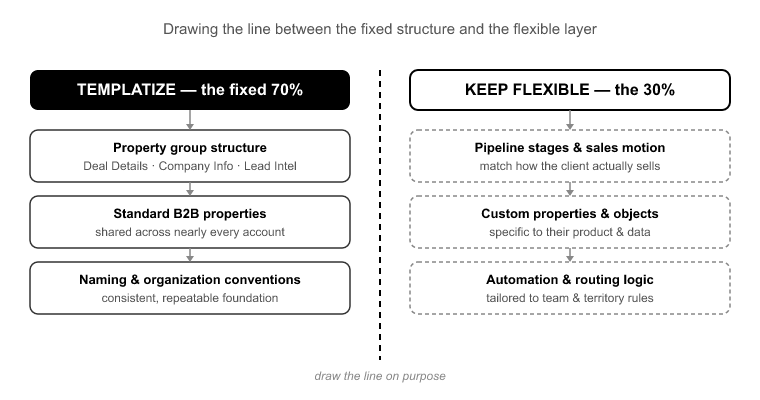
The failure mode here goes both ways. Over-templatize, and you force every client into a rigid setup that doesn't fit their sales motion. Under-templatize, and you rebuild everything from scratch. Most teams have never drawn the line on purpose, so they drift between the two.
Here's where I draw it.
Templatize the structural layer (the fixed 70%):
Keep flexible (the client-specific 30%):
The rule of thumb: if it's structurally the same across clients and only the labels change, it's a template. If it encodes a judgment about how this client sells, it's human work. The stage exit criteria are flexible. The fact that you have a five-to-eight-stage pipeline with rotation on entry is fixed.
Sequencing is the part most teams get wrong, and it's the part that causes the failures you discover weeks later. HubSpot's data model has a dependency chain. If you build out of order, you create automation that references objects that don't exist yet.
The order that works:
Property Groups → Properties → Pipelines → Deal Stages → Workflows → Reports → Permissions.
Break it and here's what happens. Build a workflow before the property it enrolls on exists, and the enrollment trigger silently never matches. I've seen a rep-assignment workflow fail this exact way. It referenced an owner property that was created after the workflow was built, so enrollment never fired and leads simply stopped getting assigned. Nobody noticed until reps started asking why their queues were empty.[4]
Same story with reports built on deal stages that later get renamed. Your forecast returns garbage because the report points at a stage internal name that no longer exists. And import data before pipelines are configured, and your deals land with no stage or the wrong one, orphaning records you then have to clean up by hand.
Order isn't a preference. It's the difference between a portal that works on day one and a portal that quietly breaks in week three.
This is where the manual model breaks down and tooling earns its place. The whole point of repeatable HubSpot onboarding is that you build your standard configuration once, refine it until it's right, and then deploy it into each new client's production portal without retyping any of it.
That's what Suprdense Config does. You build your standard Sales, Marketing, or Service Hub module (property groups, properties, pipelines, deal stages, workflows, and user permissions) and then push it into a client's production portal with one-click hub deployment. The two-day manual build becomes roughly a twelve-minute deployment.[5]
It solves the sandbox-to-production gap directly. Instead of building in a template portal and then manually recreating everything in production, which is the exact step where drift and typos creep in, CONFIG moves the configuration for you. Your baseline stays consistent across every client because it's literally the same template being deployed, not a senior admin's best recollection of what the last build looked like.
And because CONFIG deploys the structural layer, it maps cleanly onto the fixed/flexible line. It handles the 70%, the repeatable structure. Then you customize the client-specific 30% on top. That's repeatability without rigidity: consistency enforced where it should be, human judgment reserved for where it matters.
One honest boundary worth stating plainly: Config deploys and standardizes configuration, it does not migrate the client's data. Moving their existing contacts, companies, deals, and activity history into the structure you've deployed is a separate job, and that's what SuprSwitch handles. Config builds the structure. SuprSwitch moves the records into it. Two tools, two jobs, so don't expect one to do the other.
Deploying a template fast doesn't remove the need to validate. It makes validation more important, because you're now deploying at scale. A single misconfigured property in your template propagates to every client you push it to. So gate each milestone.
Here's what I check, in order:
After properties deploy: Confirm every property type is correct. A field that should be a dropdown but deployed as free text will break every workflow branch and report that depends on clean values. Check that the enumeration options match, too.
After pipelines and deal stages deploy: Verify the stage internal names, not just the display labels. Workflows and reports reference internal names. If those don't match what your automation expects, nothing downstream fires correctly.
After workflows deploy: Test enrollment on a sample record. Does the trigger actually match? Does the action fire? This is where the "workflow references a property that doesn't exist" failure gets caught, before a client sees it, not after.
After permissions deploy: Log in as each role and confirm scope. A rep who can see every other rep's deals, or a manager locked out of forecasting, is a trust problem on day one.
Validate each layer before you build the next on top of it. Errors caught at the property stage cost minutes to fix. The same error caught after you've built workflows and reports on top of it costs hours of rework and a hard conversation with the client.
Once the baseline is deployed and validated, you're finally doing the work that's worth a senior admin's rate. This is where you map the client's real sales process onto the template: renaming and redefining deal stages to match how they actually sell, setting exit criteria per stage, and adjusting the base pipeline shape to their funnel.
This is also where you handle the exceptions: the custom object for their particular business model, the unusual association labels, the reporting that reflects their specific KPIs rather than a generic template. Client-specific edge cases in their sales motion get configured here, by a human who understands the nuance.
The value of the Config-first approach is that by the time you reach this stage, all the tedious structural work is done and validated. Your skilled hours go entirely to the judgment-heavy 30%, not to retyping property groups. That's how you deliver a working, configured portal in the first few days of an engagement instead of the first few weeks. Clients judge the relationship in those first two weeks,[6] and standing up a functional portal fast changes the entire dynamic.
When the structural layer is templatized and deployed, onboarding stops being a cost center and becomes a scalable service line. Do the capacity math: if a manual Sales Hub build consumes two admin-days and CONFIG deployment plus customization takes a fraction of that, you've freed up the majority of your delivery hours per client.
Across 20 clients a year, that's the difference between hiring an admin for every handful of new accounts and scaling client volume without scaling headcount 1:1. Margin stops eroding as you grow.
It also solves the training problem. When your onboarding runs on a deployed, documented baseline instead of one senior person's memory, you can onboard new team members to your delivery motion in a fraction of the time. The process lives in the template, not in someone's head. That's what productized delivery actually means: repeatable, teachable, and consistent across every client you take on.
The agencies that scale HubSpot delivery aren't the ones with the most admins. They're the ones who stopped treating every onboarding as a blank canvas and started treating the structural layer as a deployable asset. The 70% that's identical across clients should never be built by hand more than once.
Draw the fixed/flexible line explicitly. Sequence your setup so you never build automation on properties that don't exist. Validate each milestone before the next. Deploy your baseline with SuprConfig, layer the client-specific 30% on top by hand, and move the records in with SuprSwitch when the structure is ready. That's the whole motion.
Do that, and onboarding stops being the thing that caps your growth and becomes the thing that scales it: repeatable, teachable, and consistent from the first client to the fiftieth.
Deploy fully configured Sales, Marketing, and Service Hub modules properties, pipelines, workflows — in one click with Suprdense CONFIG. Twelve minutes per setup, not two days per client.

Discover ideas, strategies, and expertise to help you streamline operations, improve customer experiences, and accelerate growth.
