
.webp?width=130&height=24&name=SuprConfig%20(2).webp)





 Book a migration call








Here's what nobody scoping a HubSpot onboarding wants to say out loud: the reason it takes three months isn't HubSpot. I've run more than 120 CRM migrations into HubSpot, and the platform has almost never been the bottleneck. The delay lives in the delivery model. Agencies rebuild the same Sales, Marketing, and Service Hub configuration by hand for every client, then run migration, validation, and training as a chain of handoffs where each phase waits on the one before it.
Fix those two problems and the three-month hubspot time to value drops to about two weeks. Not by working faster or cutting corners, but by treating configuration as a deployable artifact instead of a manual checklist, and by running data migration in parallel with setup instead of after it. That is exactly what SuprConfig and SuprSwitch were built to do. Below I'll walk through the actual mechanics.
Why HubSpot implementations actually take three months (it's not the platform)
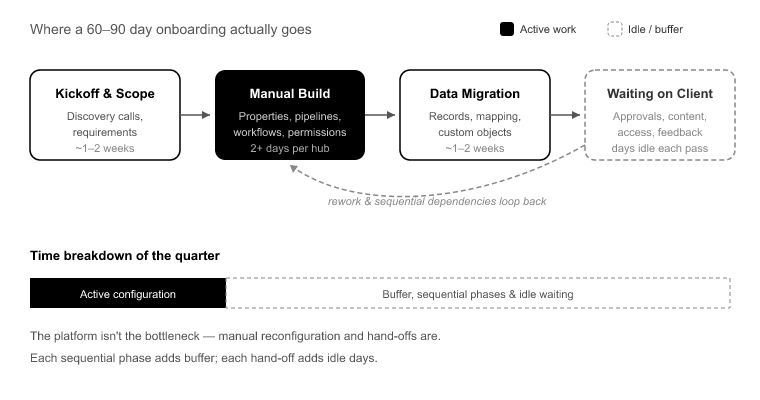
Partner-led HubSpot onboarding is usually scoped at 60 to 90 days.[1] When you break down where that quarter goes, very little of it is active configuration work. Most of it is buffer for sequential phases and idle time waiting on the client.
Start with the manual reconfiguration tax. Standing up a single Sales Hub by hand, meaning properties, property groups, pipelines, deal stages, workflows, and user permissions, takes two days minimum. Add custom objects and it takes more. Do that across three hubs and you've burned a week of pure setup before a single record moves. Here's the part that stings: it's the same work every time. The senior admin rebuilds a near-identical configuration for client after client, and human error compounds at every step. A mistyped deal stage here, a workflow enrollment trigger set wrong there.
Then there's sequential delivery. Teams finish setup, then start migration, then start validation, then start training. Each phase sits in a queue behind the last. The actual labor might be ten working days, but stretched across handoffs, sign-off waits, and idle time, it eats a quarter.
Layer on client-side stalls. Time-to-value gets measured from kickoff, but that clock keeps running while the agency waits on data exports, field-mapping sign-off, and access provisioning. None of that is technical work, and all of it stops the project cold.
And finally, the killer: migration discovery lag. Records get imported, everyone assumes it worked, and three weeks after go-live a rep opens a ticket because half the deal history is missing or the contact-company associations are orphaned. The error was there on day one. You just didn't find it until it was expensive to fix.
The two-week delivery model: parallel, not sequential
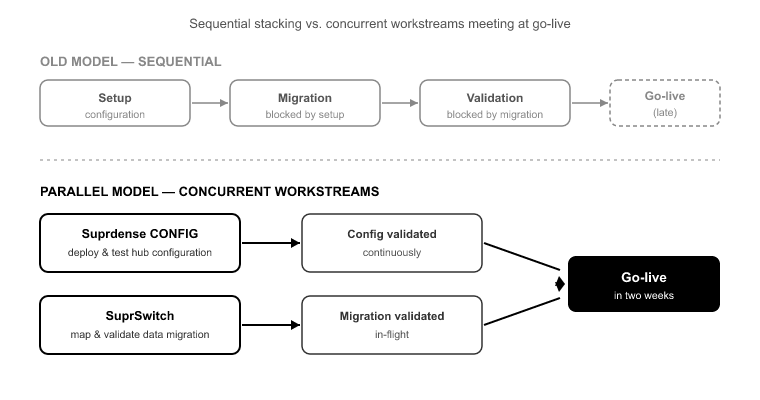
The reframe is simple to state and hard to do without the right tooling: configuration and migration should run as concurrent workstreams, with validation built into the migration itself.
In the old model, setup blocks migration and migration blocks validation. In the parallel model, Suprdense Config deploys and tests the hub configuration while SuprSwitch maps and validates the data migration at the same time. The two tracks meet at go-live instead of stacking end to end.
This only works if two conditions are met. First, setup has to stop being a manual checklist. You can't run it in parallel if it ties up a senior admin for a week. Second, migration errors have to surface during the migration, not after go-live. If validation is a separate downstream phase, you've just recreated the sequential problem with extra steps. Both conditions are solvable, and that's the rest of this article.
Compress setup: deploy hubs as artifacts, not checklists
The single biggest lever on hubspot time to value is killing manual reconfiguration. Suprdense CONFIG's one-click hub deployment takes a fully configured Sales, Marketing, or Service Hub module, meaning properties, property groups, pipelines, deal stages, workflows, and user permissions, and deploys it from sandbox to production in one action.
What used to take an agency admin two days per hub now takes roughly twelve minutes.[2] Across three hubs, that's the difference between a full week of setup and an afternoon.
The sandbox-to-production promotion model matters more than the speed. The classic failure mode is building the config in a sandbox, then rebuilding it by hand in production and hoping it matches. It never fully matches. A workflow gets missed, a property group lands in the wrong order, a permission set doesn't carry. With CONFIG, you build and test the configuration once, then promote the exact artifact. What you tested is what ships.
The second-order win is repeatability. When your setup is a deployable baseline instead of tribal knowledge, your senior admin's expertise stops being a bottleneck. A junior team member can run the deployment without reinventing the config. For an agency running 30 projects a year at two to three days of senior admin time per hub, that's more than 180 admin-days a year spent on work that is basically identical every time.[3] CONFIG turns that into a template you deploy, not a project you rerun.
Migrate in parallel without breaking associations or ownership
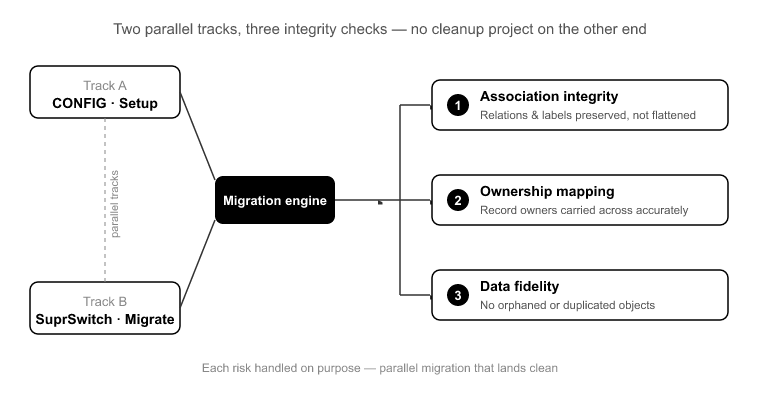
While CONFIG handles setup, SuprSwitch runs the migration on a parallel track. But parallel migration only saves time if it doesn't create a cleanup project on the other end. Three things break most migrations, and each has to be handled on purpose.
Association integrity. HubSpot's data model is relational. Contacts associate to companies, companies to deals, deals to tickets, and many of those carry association labels. A naive import flattens or orphans those relationships. SuprSwitch's association mapping preserves the contact-company-deal structure and the labels, so the relationships survive the move intact instead of landing as disconnected records.
The Activities split. This one catches teams migrating off Salesforce every single time. Salesforce stores Activities as two separate objects, Tasks and Events. HubSpot uses one unified Activities model. If your migration doesn't reconcile that split, you lose call and meeting history, and you find out when a rep goes looking for last quarter's touchpoints and they're gone. SuprSwitch handles the reconciliation so the unified timeline lands correctly.
Ownership transfer. Picture a 40,000-contact Salesforce org where 15% of records are owned by deactivated users. Without explicit ownership logic, those 6,000 records land in HubSpot unassigned, which means they fall out of every workflow, every report, and every rep's view. SuprSwitch's ownership transfer handles deactivated-user records explicitly so nothing lands orphaned.
Catch failures during migration, not after go-live
Post-import discovery is what actually blows timelines. The migration "finishes," the project moves to training, and the errors sit undetected until they surface as support tickets weeks later. At that point you're debugging a live production instance instead of a migration run.
SuprSwitch's real-time record validation checks every record as it lands. If a contact doesn't appear in HubSpot within the expected window after migration, it flags the failure right away instead of letting you find it three weeks later. You catch gaps during the run, when they're cheap to fix, not after go-live when they're expensive and visible to the client.
This also solves the most dangerous "fix" in migration work: the re-run. When teams discover a partial migration, the instinct is to re-import to fill the gaps. Without validation and dedup logic, that re-run duplicates contacts and multiplies associations, turning a 20,000-record job into a 35,000-record cleanup.[4] Real-time validation plus a built-in retry mechanism means you re-attempt only the flagged records, not the whole set.
The setup sequence that fits in two weeks
Here's the concrete practitioner timeline. It assumes the client can deliver data exports and access on schedule. More on that limit below.
Week 1, days 1–2: Kickoff, scope confirmation, and access provisioning. In parallel, build and test the hub configuration in a sandbox using SuprConfig. At the same time, begin field mapping in SuprSwitch against the client's export schema.
Week 1, days 3–5: Promote the tested configuration to production with CONFIG's sandbox-to-production promotion. In parallel, run a validation pass in SuprSwitch against a sample data set. Confirm association mapping, ownership transfer, and the Activities reconciliation behave correctly before the full run.
Week 2, days 6–8: Execute the full migration with real-time record validation active. Resolve any flagged records via retry. Because setup already shipped in week 1, migration isn't waiting on anything.
Week 2, days 9–10: Final validation reconciliation, user permission checks, and team training against the now-populated, correctly configured instance. Go-live.
The whole thing fits in ten working days because setup and migration ran at the same time and validation was continuous, not a downstream phase.
What two weeks doesn't fix and where the clock still slips
I won't oversell this. Two weeks is achievable, but the tooling compresses the technical work. It doesn't erase the human and organizational work around it.
Client data readiness is the most common slip. If the client can't produce clean exports or takes a week to sign off on field mapping, the clock runs regardless of how fast your deployment is. Set that expectation at kickoff.
Complex custom-object logic can extend the timeline for good reason. A 12-custom-object enterprise org with intricate cross-object automation needs more mapping and testing than a standard three-hub SMB setup. The parallel model still applies, it just runs a bit longer.
Change management takes real time. You can deploy a perfect instance and migrate every record cleanly, and a sales team still needs to actually adopt the new pipeline and logging habits. Tooling doesn't fix behavior.
Conclusion
The three-month HubSpot implementation is a delivery-model problem, not a platform problem. The quarter disappears into manual reconfiguration, sequential handoffs, and errors discovered after go-live, not into work that inherently takes that long.
Fix the two structural causes and hubspot time to value compresses to two weeks. Treat setup as a deployable artifact with Suprdense Config's one-click hub deployment, run migration in parallel with SuprSwitch, and bake validation into the migration itself so failures surface during the run instead of in a support ticket three weeks later.
Start with your next project. Deploy the hub configuration as an artifact, run the migration alongside it, and measure how much of your usual 60 to 90 day window was never technical work in the first place. That gap is your margin, and your client's time-to-value, back on the table.
References
- HubSpot, "HubSpot Onboarding Overview" partner-led onboarding scoping and typical implementation windows.
- Suprdense internal benchmarks measured single-hub deployment time using CONFIG one-click hub deployment versus manual configuration.
- Suprdense agency delivery analysis senior admin hours per hub deployment across a 30-project annual delivery volume.
- SuprSwitch migration case data record volume increase from duplicate contacts and multiplied associations on unvalidated re-import runs.
How to Reduce HubSpot Time-to-Value from 3 Months to 2 Weeks
Deploy fully configured Sales, Marketing, and Service Hub modules in one click with Suprdense CONFIG sandbox to production in minutes. Stop shipping quarter-long onboarding projects.
