.webp?width=130&height=24&name=SuprConfig%20(2).webp)





 Book a migration call








The first thing that breaks in a Freshsales to HubSpot migration is almost never the contacts. It's the assumption that "contacts are contacts." Teams export their Freshsales data, import it into HubSpot, and only then find out that half their pipeline was sitting in a separate Leads object HubSpot won't natively accept. Their deals arrive with no company and no contacts attached, and three years of call history collapses into a wall of undifferentiated notes. None of that is a data-volume problem. It's a data-model reconciliation problem, and it's why so many of these migrations that should take days drag out for weeks.
Freshsales and HubSpot are built on two different philosophies. Freshsales, especially the older Freshsales Classic, treats Leads, Contacts, Accounts, and custom Modules as distinct object types with their own lifecycle logic. HubSpot uses a flat object model with no native Lead record and a single unified Activities timeline. If you migrate field by field without a strategy for those structural mismatches, you don't get a clean HubSpot instance. You get orphaned deals, broken lifecycle stages, and a sales team that no longer trusts the CRM. This is the work SuprSwitch resolves at the mapping layer, before any live record moves.
Freshsales Classic vs. Freshsales Suite: Know Which Data Model You're Actually Migrating
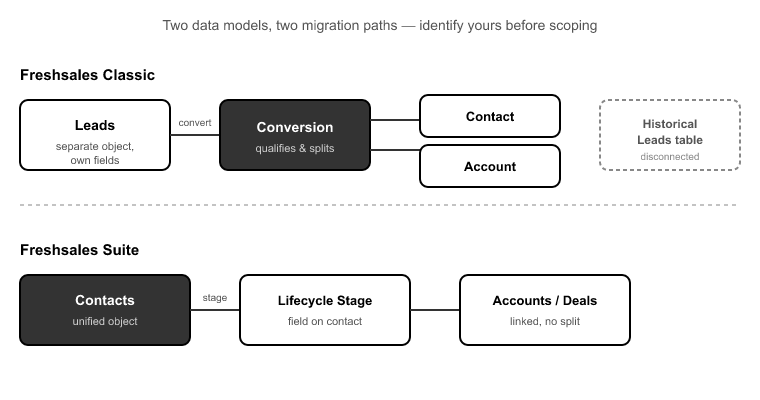
Before you scope anything, answer one question: are you on Freshsales Classic or Freshsales Suite? This single fork is the most common scoping error I see, and getting it wrong derails the whole plan.[1]
Freshsales Classic keeps Leads as a separate object with their own fields and conversion path. When a lead qualifies, you convert it, and that conversion generates a Contact and often an Account. Your historical Leads sit in their own table, disconnected from the Contacts model entirely.
Freshsales Suite merged Leads and Contacts into a single Contacts object, split by lifecycle stage. If you're on Suite, your "leads" are already Contacts with a stage attached. That's a much cleaner starting point for HubSpot, which also treats everyone as a Contact with a lifecycle stage.
The problem is that most teams don't actually know which model they're on until they're mid-migration and half their pipeline is missing. That's why SuprSwitch's Phase 1 Schema Analysis exists. On Day 1, it scans the Freshsales org and detects whether Leads live as a separate object or are folded into Contacts, counts records per object, and flags data-quality issues like duplicates, broken associations, and empty required fields before anything moves. The Leads-object decision gets made here, on paper, not discovered live during execution.
Mapping Freshsales Contacts, Leads, and Accounts to HubSpot's Flat Model
HubSpot has no core Lead object. People point to the Sales Hub Leads workspace and assume that's the equivalent. It isn't. The Leads workspace is a prospecting layer that sits on top of Contacts and Companies. It is not a distinct record type you migrate historical data into. So if you're coming from Freshsales Classic, every Lead has to become something else.
The right answer, in nearly every case, is to map Freshsales Leads to HubSpot Contacts with a defined lifecycle stage. An unconverted Freshsales Lead becomes a HubSpot Contact set to a lifecycle stage like Lead or Marketing Qualified Lead, preserving the fact that this person never reached opportunity status. Migrate them naively and you either drop them entirely or create contacts with no lifecycle context, which means your funnel reporting starts life already broken.
Accounts map to HubSpot Companies, which is straightforward on the surface. The complication is the relationship layer, which I'll cover below. What matters at the mapping stage is that SuprSwitch's Phase 2 Mapping Logic handles these object-type mismatches explicitly. It creates the custom properties in HubSpot to hold Freshsales fields that have no default equivalent, assigns lifecycle stages to migrated Leads, and defines association rules, all reviewed and confirmed before the first record moves.
Deal Pipelines and Stage Probability: Getting Forecasts Right on Arrival
Your deals will migrate. The question is whether your forecasts survive the trip.
Freshsales deal stages carry win-probability values that almost never match HubSpot's default deal-stage probabilities. If you migrate deals without mapping stage probability explicitly, every deal inherits HubSpot's default forecast for its stage, and your pipeline reporting is wrong from the first day the sales team logs in.[2] A deal your reps knew was 80% likely to close now shows whatever HubSpot's default says for that stage position, which might be 40%.
This isn't a cosmetic issue. Revenue teams build commit numbers off weighted pipeline. A migration that silently rewrites probability across a few hundred open deals hands leadership a forecast that's off by a material margin, and nobody notices until the numbers don't reconcile at month-end.
The fix is to map Freshsales pipelines, stages, and their win-probability values into the matching HubSpot pipeline structure on purpose. In Phase 2 Mapping Logic, SuprSwitch maps deal-stage probabilities as part of the pipeline transformation rather than letting them default. If your Freshsales org runs multiple pipelines, say a new-business pipeline and a renewals pipeline, each gets mapped to its HubSpot counterpart with stage order and probability preserved.
Translating Freshsales Activities into HubSpot's Unified Timeline
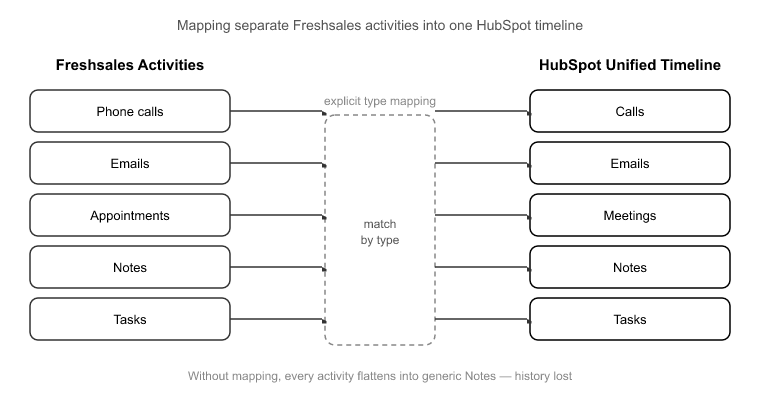
This is where the most history gets destroyed, and where the damage is hardest to reverse.
Freshsales stores Tasks, Appointments, Phone calls, Notes, and Emails as separate activity types, each with its own structure. HubSpot uses a unified Activities model with distinct types: Calls, Emails, Meetings, Notes, and Tasks, all living on a single timeline. Those two systems don't line up automatically. Without explicit activity-type mapping, a migration flattens everything into generic notes, or worse, drops call and meeting records entirely.
That matters more than it sounds, because in a typical B2B Freshsales org, 40 to 60% of timeline entries are calls and meetings.[3] That's the exact data reps rely on to remember what was discussed and when. Flatten it into notes and you haven't just lost formatting. You've lost the ability to filter, report, and reference the interaction history that makes a CRM worth using. Reps end up re-asking questions clients already answered, which is the fastest way to lose adoption after a migration.
SuprSwitch maps each Freshsales activity type to its correct HubSpot equivalent: Phone calls to Calls, Appointments to Meetings, Tasks to Tasks, Emails to Emails, Notes to Notes, so the timeline arrives structured, not collapsed. The Phase 3 Pilot Validation run is where you confirm this. It migrates a representative sample first to check that activity history formats correctly and nothing truncates, and fixes any issues in the mapping layer rather than after go-live.
Freshsales Custom Modules in a Flat Object World
Freshsales' higher tiers let you build custom Modules with their own fields and relationships. HubSpot's flat model gives you two ways to handle these, and choosing wrong costs you either money or data.
Option one is HubSpot Custom Objects, which preserve the Module as its own record type with associations. The catch is that Custom Objects require HubSpot Enterprise.[4] Option two is folding the Module's data into properties or property groups on an existing object, which works on lower tiers but flattens the relational structure.
The decision comes down to whether the Module carries genuine relational meaning. If your Freshsales Module represents something with its own lifecycle and multiple relationships, like subscriptions, properties, vehicles, or projects, it probably belongs as a Custom Object. If it's really a cluster of attributes on a Contact or Deal, folding it into a property group is cleaner and saves you an Enterprise upgrade you may not otherwise need.
SuprSwitch handles both paths in Phase 2 Mapping Logic: mapping Modules to Custom Objects where the relational structure justifies it, or into property groups where it doesn't. Making that call during mapping, not mid-migration, is what stops teams from buying an unnecessary tier or silently losing structured data.
Preserving Associations and Ownership Across the Move
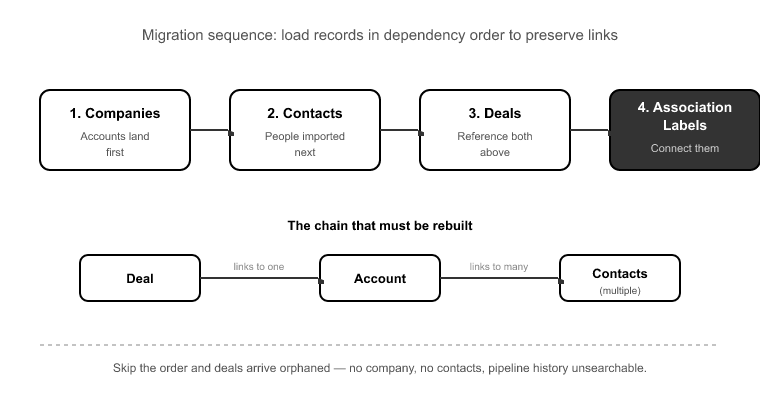
A Freshsales Deal links to one Account and multiple Contacts. That chain, Deal to Account to Contacts, has to be rebuilt in HubSpot in the correct order, or deals arrive orphaned: no company, no contacts, three years of pipeline history rendered unsearchable.
Order matters because you can't associate a deal to a company that doesn't exist in HubSpot yet. Companies have to land first, then contacts, then the deals that reference both, then the association labels that connect them. Get the sequence wrong and the associations silently fail even when every individual record imports fine. SuprSwitch's association integrity mapping preserves the Deal to Account to Contacts chain in the right order so no deal shows up disconnected.
The second silent killer is ownership. Every mature Freshsales org accumulates deactivated reps who still own historical deals and contacts. On a naive import, those records either fail outright or default to the admin account, wiping out ownership attribution and breaking every report that slices by rep. The SuprSwitch ownership transfer engine resolves these deactivated-user gaps before the migration runs, so historical records keep their original attribution instead of collapsing onto whoever ran the import.
The 3–4 Day Freshsales to HubSpot Migration: Four Phases That Replace Weeks of Cleanup
Manual Freshsales migrations drag on for 3 to 6 weeks. Not because of data volume, a 30,000-record org isn't hard to move mechanically, but because field mapping, late-discovered broken associations, and post-migration cleanup all happen sequentially and reactively.[5] You import, you find the breaks, you fix, you re-import. And CSV re-imports without a matching key are their own disaster: a partial migration that gets re-run duplicates every record. A 30,000-contact org becomes a 55,000-contact mess overnight.
SuprSwitch compresses the migration to 3 to 4 days by moving discovery and validation to the front:
Phase 1 Schema Analysis (Day 1). SuprSwitch scans the Freshsales org, detects Classic vs. Suite, counts records per object, and flags duplicates, broken associations, and empty required fields. Nothing moves. This is where the Leads-object and Custom-Module decisions get made.
Phase 2 Mapping Logic (Day 2). The transformation layer maps Freshsales objects to HubSpot's model: Leads to Contacts with lifecycle stages, Modules to Custom Objects or property groups, all five activity types to unified Activities, deal-stage probabilities to HubSpot stages, and ownership transfer rules for deactivated users. Everything is reviewed before any live record moves.
Phase 3 Pilot Validation (Day 2–3). A representative sample migrates to HubSpot to validate relational integrity, activity-history formatting, field truncation, and association chains. Issues get fixed in the mapping layer, not after go-live.
Phase 4 Final Execution (Day 3–4). The full dataset runs through SuprSwitch's migration engine with real-time record validation: if a contact doesn't appear in HubSpot within the expected window, it flags immediately and the retry mechanism re-runs the failed record without restarting the whole job. No silent data loss surfacing in a support ticket three weeks later. And because SuprSwitch runs on a no-storage architecture, your Freshsales data is never held on its servers, which is usually what IT and security sign-off hinge on.
Conclusion
A Freshsales to HubSpot migration lives or dies on the decisions you make before any data moves. The Classic-vs-Suite question determines your entire Leads strategy. Activity-type mapping determines whether your reps keep their history or lose it. Association order determines whether deals arrive connected or orphaned. And ownership logic determines whether your reporting survives. None of these are execution problems. They're mapping problems, and they're solvable on paper if you front-load the discovery.
That's the whole reason manual migrations stretch to 3 to 6 weeks while a SuprSwitch migration completes in 3 to 4 days. It isn't that SuprSwitch moves records faster. It's that Schema Analysis and Mapping Logic surface the structural mismatches on Day 1 and Day 2, and Pilot Validation proves the mapping on real sample data before the full run, so Final Execution is validated, not hopeful.
If you're not even sure whether you're on Freshsales Classic or Suite, that's the place to start, because the answer changes your entire plan. Run a schema analysis, see exactly what maps and what doesn't, and make the hard decisions before your live pipeline is on the line.
References
- Freshworks, "Freshsales Classic vs. Freshsales Suite: Understanding the Data Model," Freshworks Product Documentation, 2024.
- HubSpot, "Set up and customize your deal pipelines and deal stages," HubSpot Knowledge Base, 2024.
- Nucleus Research, "CRM Activity Data and Sales Rep Productivity Benchmarks," Nucleus Research Analyst Report, 2023.
- HubSpot, "Create and use custom objects," HubSpot Knowledge Base (Enterprise tier requirements), 2024.
- Ascend2, "CRM Migration Timelines and Common Failure Points," B2B Data Operations Survey, 2023.
Freshsales to HubSpot, without the cleanup.
SuprSwitch maps modules, preserves association integrity, and validates every record in real-time full migration in 3–4 days. Pilot run first, so nothing breaks in production.