.webp?width=130&height=24&name=SuprConfig%20(2).webp)





 Book a migration call






The most expensive mistake I see in CRM projects isn't a broken association or a lost activity record. It's a scoping error made in the very first conversation. A team asks for "a migration" from Salesforce to HubSpot, signs off on a timeline, and then discovers three weeks in that the HubSpot portal has no pipeline to receive their deals, no properties to hold their custom fields, and no workflows to route the incoming records. The data has nowhere to land. The project stalls, not because the data was hard to move, but because nobody scoped the work of building the place it was moving to.
That's the heart of crm migration vs implementation. They're two separate workstreams that get sold, scoped, and budgeted as one. Migration is the movement and transformation of data. Implementation is the configuration of the system that data moves into. They're sequenced and dependent, but they are not the same job. Treating them as interchangeable is where timelines and budgets blow up.
Migration Moves Data. Implementation Builds Where It Lands.
Here's the one-sentence distinction I give every client. Migration moves your records, associations, and activity history from a source CRM into HubSpot. Implementation builds the pipelines, properties, workflows, and permissions inside HubSpot so that data has a structured place to go.
The reason they can't be the same job is the object model. HubSpot and Salesforce do not store data the same way. Salesforce has a native Lead object. HubSpot has no Lead object at all. Salesforce splits activities into separate Tasks and Events objects, while HubSpot unifies calls, meetings, notes, and emails into one Activities timeline.[1] Every one of those differences forces a decision. And a decision about how HubSpot should be structured is an implementation decision, not a data-movement task.
So the moment you start mapping a Salesforce Lead to something in HubSpot, you've stopped doing pure migration and started doing implementation. The two are braided together. Pretend they aren't, and the seam between them is exactly where records fall through.
What CRM Migration Actually Involves
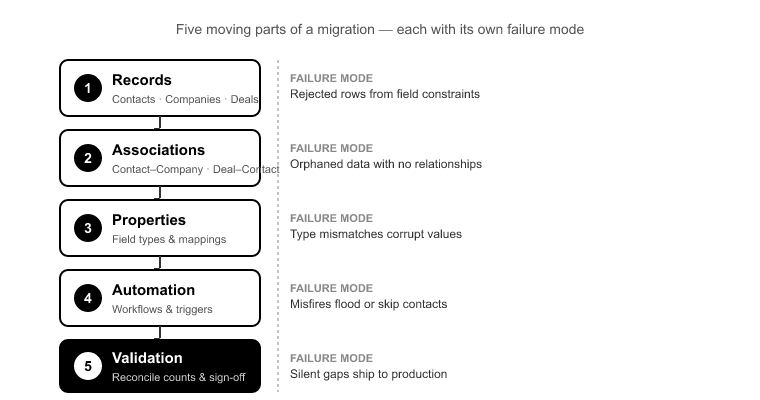
Migration is a technical execution job with five moving parts. Each one has a specific failure mode when it's mishandled.
Records. Contacts, Companies, Deals, Tickets, and any custom objects. This looks straightforward on the surface, until record counts, property types, and required-field constraints in the target portal reject rows that were valid in the source.
Associations. The contact-to-company and deal-to-contact chains that give your data meaning. Break these and you have a portal full of orphaned records: deals attached to no one, contacts belonging to no company. Association integrity mapping preserves those 1:1 relationships during transfer. Without it, the relational structure that took years to build in the source CRM arrives as a pile of disconnected rows.
Activity history. This is where sales context lives. If the Salesforce Tasks-and-Events split isn't mapped correctly into HubSpot's unified Activities timeline, call and meeting history doesn't render, even though the records technically "moved." I've watched three years of sales context vanish from a timeline because the receiving portal wasn't configured to accept the mapped activity types.
Ownership transfer. Deactivated users own records. If you don't reassign ownership before migration, those records land orphaned or get silently dropped. The SuprSwitch ownership transfer engine sets that logic before the migration runs.
Deduplication. Import a dataset with existing duplicates into a portal with no dedup rules, and the duplicates don't just carry over. Associated records multiply against each duplicate copy. That's how "5,000 clean contacts" becomes 6,400 records with tangled associations.[2]
What CRM Implementation Actually Involves
Implementation is not "setup." It's a series of process decisions that happen to be expressed in configuration.
Pipelines and deal stages. How many stages, what they're named, which are probability-weighted, and which stage-dependent fields become required at each step. This is a business-process decision, not a data task, and it's the single most common cause of migration rework I see.
Properties and property groups. Every custom field in your source CRM needs a home in HubSpot, with the right type. A Salesforce picklist doesn't automatically become a HubSpot dropdown select, and a multi-line text field truncates differently.[3] You cannot map data into properties that don't exist yet.
Workflows. Lead routing, lifecycle automation, task creation, notification logic. These define how the business operates on top of the data.
Permissions and process design. Who sees what, who owns what, which teams touch which pipelines. This is where implementation shades into organizational design.
The point is simple. Implementation is where you make decisions. Migration is where you execute against them. If you configure in a vacuum, building a clean six-stage pipeline before you've looked at the source data, you find out at load time that the source CRM has eleven stages and three stage-dependent custom fields, and your "finished" implementation gets reworked.
Where CRM Migration vs Implementation Overlaps and Where Projects Get Scoped Wrong
The dangerous work lives at the seam. These items belong to both workstreams, which means in a badly scoped project they get owned by neither.
The Salesforce Lead problem. Salesforce Leads have no HubSpot equivalent. A migration engineer has to decide: do Leads become Contacts? Contacts without a Company? Contacts flagged with a lifecycle-stage property? That is an implementation decision that governs migration mapping. Get it wrong and you either lose the Lead/Contact distinction entirely or duplicate every converted Lead.
The Activities split. Deciding how Tasks and Events collapse into the unified HubSpot Activities timeline is a mapping decision that depends on how the timeline is configured to display them. Migration can't finalize the mapping until implementation has made the call.
Pipeline stage mismatch. Eleven source stages, six configured target stages. Someone has to decide which stages merge, which get dropped, and what happens to the deals sitting in the stages that no longer exist. This is a configuration problem wearing a migration costume, and it forces either data loss or a mid-project pipeline rebuild.
Ownership and permission gaps. Deactivated-user records and ownership reassignment sit squarely between the two jobs. They're not "pure migration" and not "pure implementation," so they fall through the cracks and surface at go-live when someone asks why 400 deals have no owner.
SuprSwitch handles this seam deliberately. Phase 2, Mapping Logic forces the object-type decisions to be made and reviewed before the first record moves, and the ownership transfer engine resolves the deactivated-user gap up front. The decisions that normally surface late become explicit early.
Why Confusing CRM Migration vs Implementation Wrecks Your Timeline
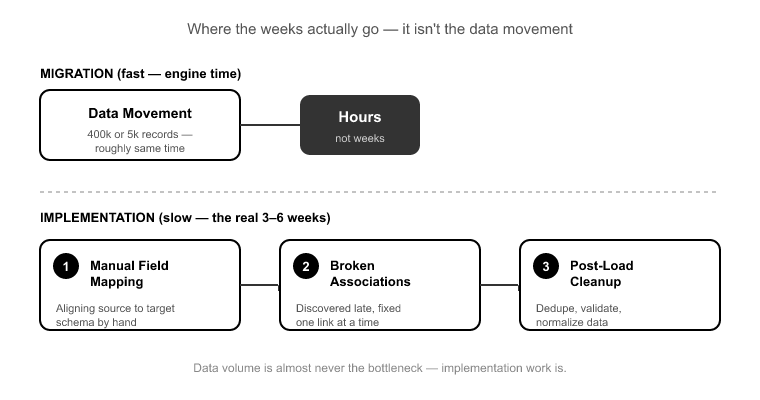
Here's the myth I want to kill: "migrations take weeks."
They don't. The data movement doesn't take weeks. A 400,000-record Salesforce org and a 5,000-record Pipedrive account take roughly the same engine time to move, because data volume is almost never the bottleneck.[4] When a migration project drags on for three to six weeks, the time is consumed by three things: manual field mapping, late-discovered broken associations, and post-load cleanup.
Every one of those is implementation or discovery work masquerading as migration. When you budget six weeks of "migration effort," you're really budgeting six weeks of implementation decisions being made slowly, manually, and out of sequence, usually mid-migration, when the cost of changing them is highest.
SuprSwitch compresses the actual migration into a four-phase process that completes in 3–4 days by moving the discovery and decision work to the front:
Phase 1, Schema Analysis (Day 1). SuprSwitch scans the source CRM and surfaces custom fields, record counts, property types, and data-quality issues like duplicates, broken associations, and empty required fields, before anything moves. This output is exactly what an implementation needs as input. It tells you what properties HubSpot has to hold the incoming data. No surprises mid-run.
Phase 2, Mapping Logic (Day 2). The transformation layer maps legacy objects to the HubSpot data model. It creates custom properties, defines association rules, resolves object-type mismatches like the Lead problem, and sets ownership transfer logic. All of it is defined and reviewed before the first live record moves.
Phase 3, Pilot Validation (Day 2 to 3). A representative sample migrates into the actual configured portal to validate relational integrity, activity-history formatting, field-level truncation, and association chains. Pipeline-stage and property mismatches get caught here and fixed in the mapping layer, not discovered after the full run.
Phase 4, Final Execution (Day 3 to 4). The full dataset runs through the migration engine with real-time record validation. If a record doesn't appear in HubSpot within the expected window, it flags immediately. Failed records auto-retry through the retry mechanism without restarting the entire job. Every record is validated before go-live is confirmed.
The reason this works is sequence. Discovery and implementation-adjacent decisions happen on Day 1 and Day 2, before any live data moves. The weeks of "migration" that other approaches burn on late discovery simply don't exist when the discovery happens first.
The Right Sequence: Discovery First, Then Configure, Then Migrate
If your project involves both workstreams, and almost every HubSpot migration does, run them in this order:
1. Discovery. Scan the source CRM before you configure anything. You cannot design a pipeline or a property schema against data you haven't inspected. This is what Schema Analysis delivers on Day 1.
2. Configure to fit the data. Build pipelines, stages, and properties informed by what the source actually contains, not by a template. If the source has eleven stages, decide deliberately how they map into your target pipeline before you commit the configuration.
3. Map, then pilot. Define the mapping logic and validate it against a live sample in the configured portal. The pilot is where configuration mismatches surface cheaply.
4. Execute and validate. Run the full dataset with real-time validation, and confirm every record before go-live.
Notice that configuration sits between two migration phases: discovery before it, execution after it. That's the dependency people miss when they scope migration and implementation as one undifferentiated blob.
Frequently Asked Questions
Can I migrate my data before HubSpot is configured?
No. The mapping layer depends on the target structure existing. You cannot map a Salesforce custom field into a HubSpot property that hasn't been created, or route a deal into a pipeline stage that isn't built. The SuprSwitch Phase 2, Mapping Logic step requires the target data model to be defined, precisely because migration transforms source objects into the configured HubSpot structure. Attempt to migrate first and you either reject the records or dump them into an unstructured portal you'll have to rework.
How long does a CRM migration actually take?
The migration itself takes 3–4 days through the SuprSwitch four-phase process: Schema Analysis on Day 1, Mapping Logic on Day 2, Pilot Validation on Day 2 to 3, and Final Execution on Day 3 to 4. Data volume barely affects that. A 400,000-record org runs in roughly the same engine time as a 5,000-record one.[4] The implementation timeline is separate and depends on how many pipelines, properties, and workflows you're building. When people quote "weeks," they're describing manual mapping and late discovery, not the data movement itself.
What happens to Salesforce Leads and Activities in HubSpot?
These are the two classic object-model mismatches. HubSpot has no Lead object, so Salesforce Leads have to be mapped to Contacts, often flagged with a lifecycle-stage property to preserve the distinction. Salesforce also splits activities into separate Tasks and Events objects, while HubSpot unifies calls, meetings, notes, and emails into one Activities timeline.[1] Both are mapping decisions handled in Phase 2, and both have to be made before migration runs. Get them wrong and you either lose the Lead/Contact distinction or your activity history fails to render on the timeline.
How do I avoid duplicates multiplying during migration?
Configure deduplication before load, not after. If you import a dataset with existing duplicates into a portal with no dedup rules, associated records multiply against each duplicate copy. One duplicated company can fracture every deal and contact associated with it.[2] The SuprSwitch Schema Analysis step surfaces duplicates and broken associations on Day 1, before any data moves, so you resolve them in the mapping layer rather than untangling them post-load.
What happens if records fail mid-migration?
The SuprSwitch real-time record validation flags failures during transfer. If a record doesn't appear in HubSpot within the expected window, it surfaces immediately, not three weeks later in a support ticket. The retry mechanism then re-runs failed records automatically without restarting the entire job, so a handful of failures don't force you to re-migrate 400,000 records from scratch.
Conclusion
The confusion between crm migration vs implementation isn't semantic. It's the specific place where projects lose weeks and budgets. Migration moves the data. Implementation builds where the data lands. They're dependent and sequenced, and the seam between them, object-type mapping, pipeline decisions, ownership gaps, is where records fall through when the two get scoped as one job.
The fix is sequence. Discover before you configure. Configure to fit the data you actually have. Map and pilot before you execute. That ordering is exactly why SuprSwitch runs Schema Analysis and Mapping Logic before any live data moves. The discovery work that normally drags a migration into week four happens on Day 1 and Day 2 instead.
Before you sign off on a "migration," find out how much of it is actually implementation. Run the schema scan first. Once you know what's in your source CRM and what your HubSpot portal needs to receive it, the timeline stops being a guess, and the project stops blowing up at go-live.
References
- HubSpot, "Understand the HubSpot CRM object model," HubSpot Knowledge Base, 2024.
- HubSpot, "Deduplication of contacts, companies, deals, and tickets," HubSpot Knowledge Base, 2024.
- HubSpot, "Manage your properties and property field types," HubSpot Knowledge Base, 2024.
- Salesforce Developers, "Object Model and Data Migration Considerations," Salesforce Architecture Documentation, 2023.
Scoping a migration, not a rebuild?
SuprSwitch moves your CRM data with real-time record validation and association integrity full migrations in 3–4 days, not weeks.