
.webp?width=130&height=24&name=SuprConfig%20(2).webp)





 Book a migration call







DIY CRM Migration vs Managed Migration: Which Is Right for You?
-
Himanshi

- Date: September 11, 2026
- 11 min read
Here's the question I get on every scoping call: "We have 180,000 records, how long will this take?" And here's the honest answer nobody wants to hear first: the record count is one of the least useful numbers you can give me. I've moved 400,000-record Salesforce orgs through the migration engine in a matter of hours. The transfer is fast. What eats three to six weeks in a typical project isn't the data moving, it's the manual work stacked around the transfer: field mapping done in spreadsheets, broken associations discovered mid-run, deactivated-user ownership gaps nobody planned for, and post-migration cleanup that only surfaces when a rep logs in and can't find their pipeline.
Your crm migration timeline depends on when you find the problems, not how much data you have. Move discovery and validation to the front, before a single live record moves, and a large, messy migration completes in 3–4 days. Leave discovery for mid-run, and you're re-running the whole job in week three. This post breaks down what actually drives the timeline, where projects stall, and how the four-phase process I use with SuprSwitch compresses the whole thing.
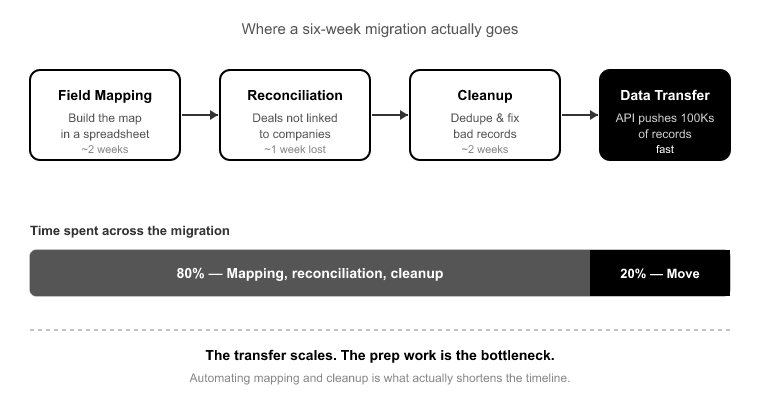
Roughly 80% of a manual CRM migration is spent on mapping, reconciliation, and cleanup. Only about 20% is actual data movement.[1] The engine pushing records into HubSpot is the part that scales. API throughput handles hundreds of thousands of records without breaking a sweat.[2]
So when a migration "takes six weeks," almost none of that is the transfer. It's the two weeks of building a field map in a spreadsheet, the week lost when someone discovers deals aren't linked to companies, and the two weeks of cleanup after go-live when duplicates and orphaned records surface as support tickets.
This is the reframe that changes how you scope. Stop asking "how fast can we move the data" and start asking "how fast can we find and fix the problems." The problems are the timeline. Everything else is a background job.
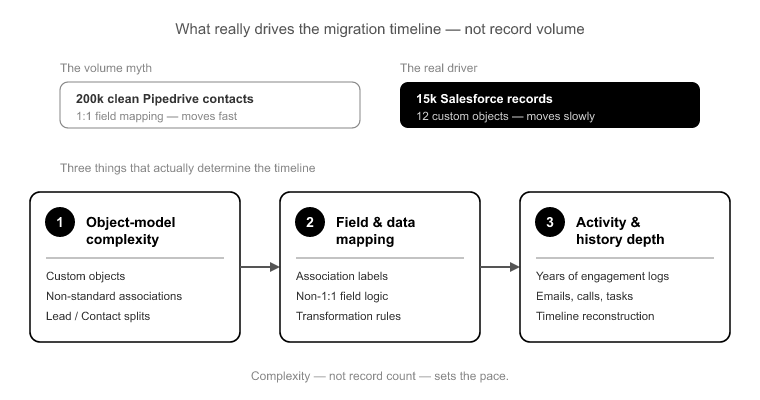
Volume is not the variable stakeholders think it is. A clean 200,000-contact Pipedrive export with near 1:1 field mapping moves faster than a 15,000-record Salesforce org with 12 custom objects, Lead/Contact splits, association labels, and three years of activity history. Practitioners know this instinctively. Stakeholders almost never do.
Three things drive the real crm migration timeline:
Object-model complexity. Every custom object, every non-standard association, every Salesforce Lead with no native HubSpot equivalent adds mapping decisions. Salesforce Leads map to Contacts, and sometimes Companies, and that decision logic has to be defined up front, not improvised mid-run.
Data quality. Duplicates, empty required fields, and broken source associations don't just slow the transfer, they multiply on import if you don't catch them first. Bring 5,000 messy contacts into HubSpot without a dedup and matching strategy, and you'll leave with 5,000 plus however many partial duplicates the import manufactured.
Object-type mismatches between source and target. Salesforce splits Activities into Tasks and Events. HubSpot has one unified Activities model with typed engagements: calls, meetings, emails, notes.[3] Pipeline stages rarely map 1:1. Association labels like "Decision Maker" or "Billing Contact" get dropped entirely if your tool only preserves the raw association and not the label. Each mismatch is a mapping decision that, left undefined, becomes a cleanup project.
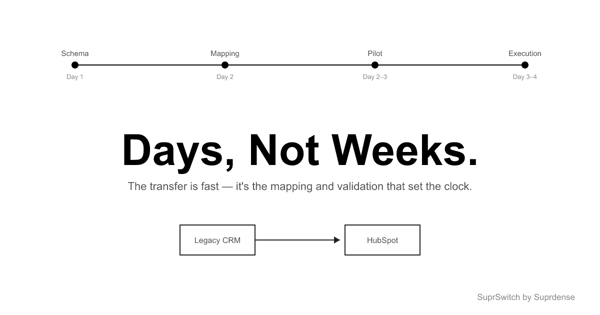
Every SuprSwitch migration runs through four phases across 3–4 days. The reason it's days and not weeks is simple: the discovery and validation work that normally surfaces mid-run gets moved to the front, before any live data moves.
Phase 1 Schema Analysis (Day 1). SuprSwitch scans the source CRM database and surfaces custom fields, record counts, property types, and data quality issues like duplicates, broken associations, and empty required fields, all before anything moves. This is where the hidden timeline-killers get found. In a manual migration, these surface in week three. Here they surface on Day 1, when fixing them costs you a mapping adjustment instead of a full re-run.
Phase 2 Mapping Logic (Day 2). The transformation layer maps every source object to the HubSpot data model. Custom properties get created in HubSpot, association rules get defined, object-type mismatches get resolved (the Lead-to-Contact decision, the Tasks-and-Events-to-Activities split), and the ownership transfer engine sets reassignment logic for deactivated users. The entire map is defined and reviewed before the first record moves. This is the phase clients own. Mapping review and sign-off is where your team's decisions get locked in.
Phase 3 Pilot Validation (Day 2–3). A representative sample migrates into HubSpot to validate relational integrity, activity history formatting, field-level truncation, and association chains. This is the specific mechanism that kills the "run it, break it, unwind it, re-run it" spiral. Any issue caught here gets fixed in the mapping layer, not after 200,000 records have already landed wrong.
Phase 4 Final Execution (Day 3–4). The full dataset runs through the migration engine with real-time record validation. If a record doesn't appear in HubSpot within the expected window, it flags immediately. Failed records hit the retry mechanism and re-run without restarting the whole job. Every record is validated post-migration before go-live is confirmed.
Skip Phase 1 and you discover broken associations mid-run. Skip Phase 3 and you find field truncation after go-live, one confused rep at a time. The phases aren't bureaucracy. Each one is a place a manual migration goes to die.
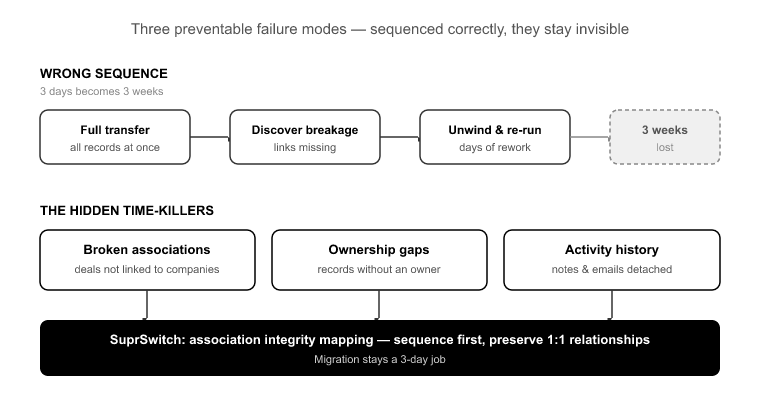
Three failure modes turn a 3-day migration into a 3-week one. Every one of them is preventable, and every one of them is invisible if you sequence the migration wrong.
Broken associations. This is the single biggest cause of a "two-week migration" becoming a two-month one. Teams run the full transfer, then discover deals aren't linked to companies or activities aren't attached to contacts. Now they're unwinding and re-running. SuprSwitch's association integrity mapping preserves 1:1 relationships between objects, so deals stay linked to companies and activities stay attached to contacts. And because association chains get validated in the pilot phase, a break gets caught on a sample of a few hundred records, not on the full run.
Deactivated-user ownership gaps. When a record's owner no longer exists in the source system, most migrations either fail those records or dump them all on an admin. Reps log in day one and their book of business is orphaned. That's not a data issue, it's a trust-killer that poisons adoption. The ownership transfer engine handles this before the migration runs. Reassignment logic gets defined in the mapping layer in Phase 2, so no record lands orphaned on go-live day.
Activity history mismatches. If your mapping doesn't handle the Salesforce Tasks-and-Events split into HubSpot's unified Activities model, call and meeting history silently disappears. Nobody notices until a rep goes looking for a past conversation and it's gone. Pilot Validation catches formatting issues here on the sample, before the full history moves. "The job finished running" is not the same as "the history is intact."
The mechanism isn't a faster engine. It's sequencing. The industry-default 3–6 week timeline is real,[4] but it's a symptom of doing the transfer first and discovering problems after. SuprSwitch inverts that.
Discovery moves to Day 1 with Schema Analysis. Mapping decisions get locked and reviewed on Day 2. The pilot validates relational integrity and activity formatting on Day 2–3, so nothing breaks on the full run. Final Execution on Day 3–4 runs with real-time record validation flagging failures during transfer, not weeks later. Failed records auto-retry via the retry mechanism without a full re-run.
For technical buyers scoping the security dimension: SuprSwitch runs on a no-storage architecture, so customer data is never held on SuprSwitch servers. That matters for the timeline too, because it removes the data-residency and vendor-storage review that can add a week to your compliance sign-off.
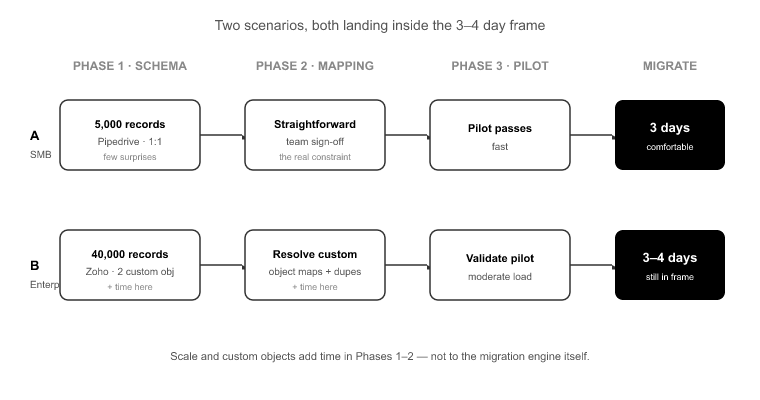
Here's what the ranges actually look like, all landing inside the 3–4 day frame:
Clean 5,000-record Pipedrive, near 1:1 mapping. Schema Analysis finds few surprises, mapping is straightforward, and the pilot passes fast. This is a comfortable 3-day migration, and the constraint is your team's mapping sign-off in Phase 2, not the tool.
40,000-record Zoho with two custom objects and moderate duplicate load. Still 3–4 days. The added time is in Phase 1 and Phase 2, resolving custom object mapping and defining the dedup strategy, not in the transfer.
400,000-record Salesforce with 12 custom objects, Lead/Contact splits, association labels, and three years of activity history. This is a 4-day migration. The volume doesn't drive it, the mapping complexity does. Schema Analysis carries more weight and the pilot validates more association chains, but the full execution still runs in hours, not days.
Notice what doesn't happen in any of these: nobody discovers a broken association in week three, because the discovery already happened on Day 1.
Give your stakeholders honest language. Promise a 3–4 day execution window, but be explicit that the clock depends on how fast their team reviews and signs off the mapping in Phase 2. That's the one dependency that lives on the client side, and it's the most common cause of a slipped date.
Caveat the things you genuinely can't know until Schema Analysis runs: the true duplicate load, the number of records owned by deactivated users, and how badly the source associations are already broken. Never commit to a timeline blind. The whole point of running Phase 1 first is that you scope on real numbers, not a guess against record count.
The 3–6 week CRM migration isn't a law of physics. It's a sequencing problem. When you run the transfer first and discover broken associations, ownership gaps, and activity mismatches afterward, you spend weeks unwinding and re-running. When you find those problems on Day 1, you fix them in the mapping layer and the full run goes clean.
That's the entire logic behind the four-phase SuprSwitch process: Schema Analysis on Day 1, Mapping Logic on Day 2, Pilot Validation on Day 2–3, Final Execution on Day 3–4, with real-time record validation, association integrity mapping, and the ownership transfer engine doing the work that manual migrations leave for the cleanup phase.
So the next time someone asks how long your migration will take, don't answer from the record count. Run the Schema Analysis, find the problems while they're cheap to fix, and scope the crm migration timeline on real numbers. That's the difference between a 4-day migration and a 4-week one.
SuprSwitch moves discovery and validation to Day 1–2, so large migrations run in 3–4 days, not 3–6 weeks. Catch the failures on Day 2, not in a support ticket three weeks later..

Discover ideas, strategies, and expertise to help you streamline operations, improve customer experiences, and accelerate growth.