Book a migration call

The migration report says 400,000 records moved. The contact count matches. The company count matches. Everyone signs off, the old Salesforce org gets decommissioned, and three weeks later a rep opens a key account and finds nothing. No company link, no activity history, no owner. The data is technically in HubSpot. The relationships between the data are gone.
This is the failure mode nobody scopes for. Migrations don’t break on record count. They break on the relational layer. The contacts and companies come across fine because they’re flat objects. What silently drops is the connective tissue: the associations linking a contact to their company, the call and meeting history that gives a deal its context, and the ownership assignments that route accountability. Those three things are what make a CRM a CRM, and they’re exactly what a naive import flattens.
The fix isn’t a bigger import tool. It’s a migration sequence that validates relational integrity, history formatting, and ownership logic before the full dataset moves. That’s the core of real crm data migration best practices, and it’s why SuprSwitch front-loads schema analysis and pilot validation into the first two days instead of discovering broken associations in a post-go-live support ticket.
Why CRM Migrations Lose Data at the Relational Layer, Not the Record Layer
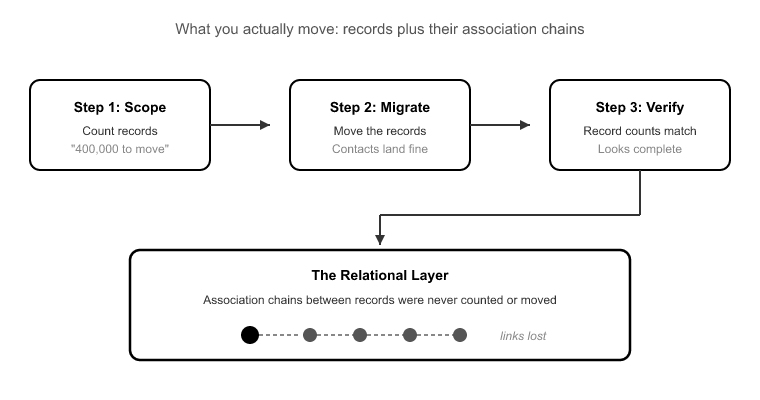
When teams scope a migration, they count records. “We have 400,000 records to move.” That framing is where migrations go wrong, because 400,000 records is not what you’re moving. You’re moving the records plus the association chains between them.
A single company in a mature CRM can hold hundreds of associated contacts, deals, tickets, and activities. Association count routinely exceeds record count by an order of magnitude.[1] When someone says “we just need to move the contacts,” they’re describing maybe 20% of the actual work, and they’ve mentally excluded the 80% that’s hardest to get right.
Here’s why the relational layer is fragile. Records are self-contained: a contact has a first name, last name, and email. Copy those fields into HubSpot and the record is intact. But an association is a reference. It points from one record to another using internal IDs that are completely different between the source CRM and HubSpot. If your migration doesn’t explicitly rebuild those pointers against HubSpot’s new IDs, the reference resolves to nothing. The contact imports. The company imports. The link between them evaporates.
The same logic applies to activity history and ownership. An activity is logged against a record ID. An owner is a reference to a user ID. Break the ID resolution and you don’t get an error. You get a record that looks complete but has lost everything that made it useful. That’s the trap: flat importers report success on record count while quietly dropping the relational layer.
CRM Data Migration Best Practices for Preserving Associations
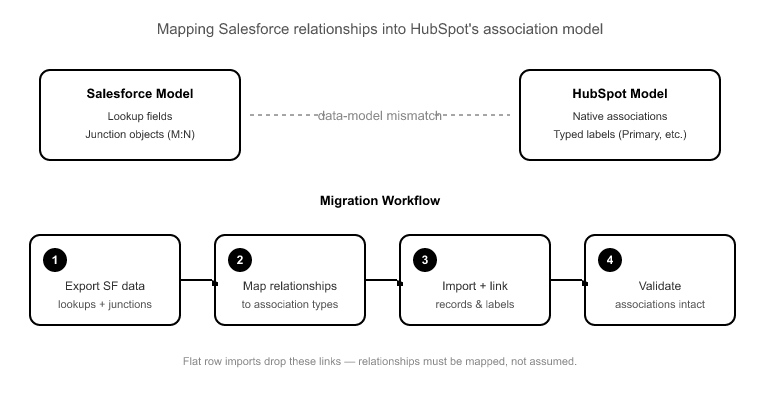
The associations problem starts with a data-model mismatch. Salesforce represents relationships using junction objects and lookup fields. A contact’s link to an account lives in a lookup, and many-to-many relationships get their own junction records. HubSpot uses a native association model with typed association labels (Primary company, Billing contact, Decision maker, and so on).
These two models don’t line up automatically. If your migration imports Contacts and Companies as flat rows with no association rules defined, you end up with the classic outcome: 40,000 contacts, 8,000 companies, and zero links between them. There’s no button to reconstruct “who works where” after the fact. That information lived in the source lookups you didn’t map, and if the source CRM is decommissioned, it’s unrecoverable.
SuprSwitch handles this with association integrity mapping, which preserves the 1:1 object relationships as it rebuilds them against HubSpot’s ID space. During Phase 2 Mapping Logic (Day 2), the transformation layer defines the association rules explicitly: which source relationship maps to which HubSpot association type, and which label it carries. That mapping is reviewed before a single record moves, so the link between a contact and their company is designed in, not left to chance during a bulk import.
This is also where object-type mismatches get resolved. Salesforce Leads, for example, have no native HubSpot equivalent. HubSpot models that pre-qualified state as a lifecycle stage on the Contact object, not a separate object. Without an explicit rule, Leads either fail to import or land somewhere that corrupts your funnel reporting. The mapping layer is where you make that decision deliberately.
Migrating Activity and Notes History Without Flattening It
Activity history is the second thing that silently disappears, and Salesforce migrations have a specific trap here that catches practitioners who’ve never done one.
Salesforce stores activities across two separate objects: Tasks and Events. HubSpot has one unified engagements model spanning calls, emails, meetings, and notes. To migrate cleanly, you need a transformation rule that merges those two source objects into HubSpot’s single model, without collapsing the distinction between a logged call and a scheduled meeting, and without losing the record ID each activity was logged against.
Get this wrong and you lose the chronological trail reps depend on. A deal with no activity history is a deal with no story. The rep can’t see the last conversation, the objection that stalled it, or the meeting where the champion went quiet. Two things have to survive the transformation: the timestamp (so the history stays in chronological order) and the associated record ID (so the engagement stays attached to the right contact and deal).
In SuprSwitch, the Tasks/Events to unified Activities reconciliation is defined in the mapping layer during Phase 2 and then verified in Phase 3 Pilot Validation. The pilot run migrates a representative sample specifically so you can confirm activity history formatting and association chains on real records before committing the full dataset. If a call log lands with the wrong timestamp or detaches from its deal, you catch it on the sample and fix it in the mapping, not across 400,000 records after go-live.
Ownership Transfer and the Deactivated-User Problem
Every migration inherits a graveyard of former employees. The rep who owned a marquee account two years ago has left the company, and their user seat was deactivated the day they walked out. Their name is still stamped on hundreds of deals and contacts as the owner.
If you don’t remap ownership before the run, those records import as ownerless, or fail validation entirely, because HubSpot can’t resolve an owner reference to a user that doesn’t exist in the portal. Ownerless records are not a cosmetic problem. They break territory routing, they fall out of reporting rollups keyed on owner, and they never enroll in workflows whose triggers depend on owner. An entire book of business can go dark.
SuprSwitch’s ownership transfer engine handles this before the migration runs. During Phase 2, deactivated-user ownership gaps get remapped according to logic you define: reassign to the current territory owner, roll up to a manager, or route to a house account. The decision is made deliberately in the mapping layer, so no record lands ownerless and no owner-keyed automation silently fails on day one.
Deduplication of CRM Data Before Migration
Source CRMs accumulate duplicates over years: the same contact entered three times by three reps, the same company under two spellings. The instinct is to migrate first and clean up in HubSpot later. That’s backwards, and here’s the specific reason.
When you import duplicates, you don’t just carry the mess over. You fracture the relational layer across the copies. Contact A gets two deals and four activities; duplicate Contact A’ gets three deals and six activities. Neither record shows the full picture, because the associations and history split across both copies based on which duplicate each one happened to reference in the source. Now deduplication in HubSpot means merging records and reconciling their scattered associations, a far harder job than catching the duplicates before they multiply their links.
This is why deduplication of CRM Data belongs in Phase 1 Schema Analysis. SuprSwitch scans the source CRM for duplicates as part of the same pass that surfaces custom fields and broken associations, so the mess gets resolved in the mapping layer before it can fragment your history. Clean the data while it’s still one dataset, not after you’ve split it in two.
Why Pilot Validation Is the Step Most Migrations Skip
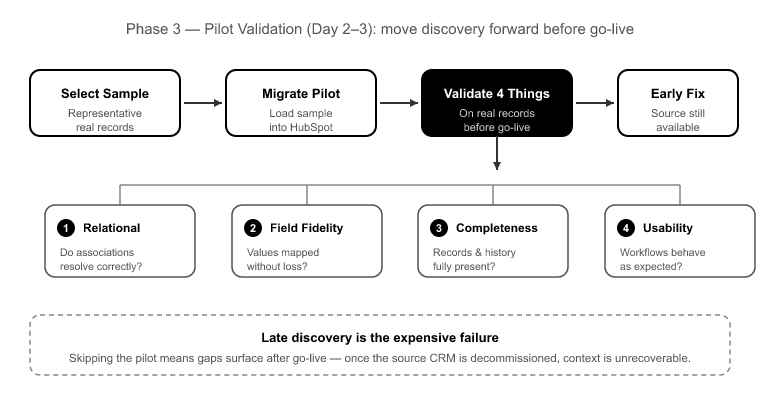
The most expensive failure mode in any migration is late discovery. Everything “looks migrated,” go-live happens, the source CRM gets decommissioned, and weeks later someone finds the gap. By then the context is unrecoverable because the source is gone.
Pilot validation exists to move that discovery forward. In Phase 3 Pilot Validation (Day 2–3), SuprSwitch migrates a representative sample into HubSpot and validates four things on real records: relational integrity (do associations resolve?), activity history formatting (did Tasks and Events merge correctly with timestamps intact?), field-level truncation (did a long text field get cut off against a HubSpot property limit?), and association chains (does a company still connect to its contacts, and those contacts to their deals?).
Any issue found here is fixed in the mapping layer and re-validated, not patched across the full dataset after the fact. This is the step that separates a 3–4 day migration from a 3–6 week one.[2] Migrations that drag on aren’t slowed by data volume; they’re slowed by broken associations discovered mid-run and the manual cleanup that follows. Volume is a throughput problem. Relational integrity is a sequencing problem, and the pilot is how you solve the sequencing before the throughput matters.
The 4-Day Migration Sequence That Preserves All Three
Here’s how the whole thing fits together. SuprSwitch runs migrations as four phases across 3–4 days, with all the discovery and validation work front-loaded before live data moves.
Phase 1 Schema Analysis (Day 1). SuprSwitch scans the source CRM and surfaces custom fields, record counts, property types, duplicates, broken associations, and empty required fields. Nothing migrates yet. This is where the three loss categories, associations, history, and ownership, get identified rather than discovered mid-run. It’s also where empty required fields get caught, so records don’t silently fail against HubSpot’s required-property rejection later.
Phase 2 Mapping Logic (Day 2). The transformation layer maps source objects to the HubSpot data model. Custom properties get created, association integrity mapping rules get defined, the Tasks/Events to unified Activities transformation is set, deal-stage mapping is resolved so deals don’t land in the wrong pipeline stage and corrupt forecasting, and the ownership transfer engine logic is configured. Everything is reviewed before the first record moves.
Phase 3 Pilot Validation (Day 2–3). A representative sample migrates to validate relational integrity, activity formatting, truncation, and association chains. Issues get fixed in the mapping, not post-migration.
Phase 4 Final Execution (Day 3–4). The full dataset runs through the migration engine with real-time record validation: if a record doesn’t appear in HubSpot within the expected window, it flags immediately. Failed records auto-retry through the retry mechanism without restarting the full job. Every record is validated post-migration before go-live is confirmed. Throughout, SuprSwitch’s no-storage architecture means your customer data is never held on our servers. It moves from source to HubSpot without persisting anywhere in between.
Conclusion
Records are the easy part of a migration. Any importer can copy a contact’s name and email into HubSpot. What separates a clean migration from a corrupted one is whether the relational layer survives: the associations that link contacts to companies, the activity history that gives deals their context, and the ownership that routes accountability.
Those three things break silently, and they break because of decisions made, or skipped, before any data moves. The best crm data migration best practices all point in the same direction: front-load the discovery. Surface the broken associations, the Tasks/Events split, the deactivated-user gaps, and the duplicates in schema analysis. Design the mapping deliberately. Validate on a pilot. Then run the full dataset with real-time validation confirming every record lands intact.
That sequence is what compresses a migration from weeks to 3–4 days, not because the data moves faster, but because you stop discovering problems mid-run and after go-live. Get the sequencing right, and the throughput takes care of itself. Don’t decommission your source CRM until every association, every activity, and every ownership assignment has been validated in HubSpot, because once the source is gone, the context you dropped is gone with it.
Frequently Asked Questions
01 What are the best practices for CRM data migration?
The best CRM data migration practices include analyzing the source schema, mapping fields and relationships, preserving associations and activity history, resolving ownership gaps, deduplicating data, running a pilot migration, and validating the full dataset before decommissioning the source CRM.
02 How do you prevent data loss during a CRM migration?
Prevent data loss by mapping not only records and fields but also associations, activity history, ownership, and other relational data. Run a representative pilot migration and validate the results before migrating the full dataset or decommissioning the source CRM.
03 How do you preserve CRM associations during migration?
CRM associations must be explicitly mapped from the source system to the destination system. Because source and destination CRMs use different record IDs and relationship models, association rules should be defined and tested before the full migration.
04 How do you migrate Salesforce activity history to HubSpot?
Salesforce stores activities across Tasks and Events, while HubSpot uses a unified engagements model. The migration should transform these objects while preserving timestamps, activity types, and the record IDs they are associated with.
05 What happens to CRM records owned by deactivated users during migration?
Ownership should be remapped before migration. Records owned by deactivated users can be reassigned according to predefined rules, such as a current territory owner, manager, or house account, preventing ownerless records and broken owner-based workflows.
06 Should you clean duplicate CRM records before or after migration?
Duplicates should ideally be identified and resolved before migration. Migrating duplicates can split associations, deals, and activity history across multiple records, making cleanup more complicated after the data reaches the new CRM.
07 Why is pilot validation important in CRM migration?
Pilot validation lets teams test associations, activity history, field limits, and relationship chains on a representative sample before migrating the entire dataset. Problems can then be corrected in the mapping logic instead of requiring large-scale post-migration cleanup.
08 How do you verify a CRM migration before decommissioning the old CRM?
Validate the migrated records, associations, activity history, ownership, and key fields before decommissioning the source CRM. The source should remain available until the destination data has been fully verified.
References
- HubSpot, “Understand the association model between records, activities, and objects,” HubSpot Knowledge Base, 2024.
- Salesforce, “Migrate Data to a New Org: Planning and Sequencing Considerations,” Salesforce Architects Guide, 2023.
Keep Your Associations, History, and Ownership Intact
SuprSwitch preserves object associations, activity history, and record ownership validated in real-time, live in 3–4 days.